KG-Chart for Cross Stitch User's ManualHow to use the KG-Chart |
As I'm not a native English speaker, this document probably has many strange English sentences. So, Please use a comment form to correct any English mistakes etc.
Thank you - Keiji
Thank you - Keiji
Other Stitches Drawing Toolbar
When you chose "Other Stitch" on the "Edit Mode" tab, this toolbar will be displayed.
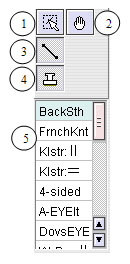
(1) Back Stitch Selection Tool
(2) Drag Tool: Move the view by dragging the view port.
(3) Back Stitch Tool
(4) Stamp Mode on/off
When you select the Back Stitch Tool(3), "Stitch Type" toolbar will show up (5).
If you turn on the Stamp Mode, you can draw the shape by left clicking (except back stitch and cut line)
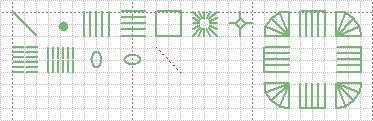
Hardanger embroidery: Klaster Block、Algerian Eyelet、Dove's Eye、WovenBar、Picot、Cutting Line、Button Hole Edge
(1) Back Stitch Selection Tool
(2) Drag Tool: Move the view by dragging the view port.
(3) Back Stitch Tool
(4) Stamp Mode on/off
When you select the Back Stitch Tool(3), "Stitch Type" toolbar will show up (5).
If you turn on the Stamp Mode, you can draw the shape by left clicking (except back stitch and cut line)
Supported Back Stitch
Cross Stitch: French Knot、Four-SidedHardanger embroidery: Klaster Block、Algerian Eyelet、Dove's Eye、WovenBar、Picot、Cutting Line、Button Hole Edge
 Bottom
Comments
Re: Other Stitches Drawing Toolbar
#1camilla @ 10/16/11 4:21 AMwhy is it not possible to delete these kind of stitches. I have no trouble removing the normal cross stitches, but these are stuck.
Threads/Comments closed.
Contents List [-] - A Cover Page
- Preface
- Acknowledgement
- Main Functionality
- System Requirement
- Screens
- Main Screens
- A Drawing Toolbar
- Other Stitches Drawing Toolbar
- Palette
- Selected Color List
- File/View Toolbar
- Menu Bar
- Creating and saving a chart
- Creaing a new chart
- Loading a saved chart
- Saving a chart
- Converting an image to a chart
- Saving a chart in a standard image format
- Chose a Background Color
- Chart Information - View & Edit
- Confirming the number of colors
- Resizing
- Editing Cross Stitch
- Basic Drawing Tools
- Drawing Special Stitches
- Basic Drawing Tools (2)
- Selection
- Changing a color and a mark
- Editing Other Stitches
- Drawing Back Stitches / Other Stitches
- Selecting Other Stitches
- Changing the color
- Checking the color
- Chaning the line style
- Adding comments to the chart
- Drawing Support Tools
- Cursor Information
- Support Lines
- Resizing Drawing Area and Palette Area
- Realview to check finished image
- Print Preview and setup
- Print contents
- An arrangement of a chart and a color table
- Automatic Divided Printing
- Options
- About the Author
- Search
Recent Comments [-] - A Cover PageHow can I create a h
- A Cover PageHi, I'm using KG-Cha
- Editing Other StitchesHi, Great program!
- File/View ToolbarHi Donna, Select a
- File/View ToolbarHow do I use the rot
- Saving a chart in a standard image formatIs there any way to
- Creaing a new chartThanks Joseph! I've
- Creaing a new chartI think "For cross s
- Saving a chart in a standard image formatWhat is the solution
- Saving a chart in a standard image formatI have a suggestion
- 3164