KG's 11 dimensional retrospection
http://www.iktsoft.net/keiji-en/blog/
Keiji's blog about Software Engineering, Computer Science, Astronomy, etc2024-10-23T12:25:46-07:00MagiCirBrk - Magic Circle Puzzle game
http://www.iktsoft.net/keiji-en/blog/12150
MagiCirBrk is a puzzle game to challenge your pattern recognition! Choose the right pattern for each ring and break the Magic Circle!<br />
<br />
MagiCirGen (iTunes App Store for iOS)<br />
<a href="https://itunes.apple.com/us/app/magicirbrk/id1275734332?mt=8" target="itunes_store"><img src="/images/apple/Available_on_the_App_Store_Badge_US-UK_135x40.png" alt="MagiCirGen - Mozusystems, LLC" style="border: 0;"/></a>
MagiCirGen (iTunes App Store for iOS) ]]>keiji2017-09-01T05:48:00-07:00MagiCirGen - macOS version
http://www.iktsoft.net/keiji-en/blog/12114
macOS version is now available.<br />
<br />
MagiCirGen (Apple Mac App App)<br />
<a href="https://itunes.apple.com/us/app/magicirgen/id1250973344?mt=12" target='_blank'><img src="/ws/f/208/1622.png" /></a><br />
MagiCirGen (Apple Mac App App)
]]>keiji2017-06-23T12:33:00-07:00OpenCV for OSX
http://www.iktsoft.net/keiji-en/blog/12112
I had really hard time building OpenCV for OSX. So here is a memo.<br />
Below, I used XCode 8.3.3, and OpenCV 3.2.0. (As of 2017-6-22)<br />
<br />
1. Download the OpenCV source <a class='DOC_LINK' target='_blank' href="//opencv.org/releases.html" title="Open CV Download site">Open CV Download site</a>, and unzip it somewhere.<br />
For example:<br />
Unzip it in /SDK/opencv3/opencv-3.2.0/<br />
<br />
2. Download CMake if you don't have it.<br />
<a class='DOC_LINK' target='_blank' href="//cmake.org/" title="CMake">CMake</a><br />
<br />
3. Create a folder for the build.<br />
e.g. /SDK/opencv3/build<br />
<br />
4. Use CMake, point to the root folder of the OpenCV folder.<br />
e.g.<br />
"Where is the source code": /SDK/opencv3/opencv-3.2.0/<br />
"Where to build the binaries": /SDK/opencv3/build<br />
<br />
5. Generate the xcode project.<br />
<br />
6. Open the xcode project (It should be in /SDK/opencv3/build), and build it.<br />
Build both "command-B" and "Archive".<br />
This way, it generates dylib in the folder: /SDK/opencv3/build/lib<br />
The dylib in this folder is a link, so go to the original file folder by right click and select "Show Original"<br />
<br />
These dylib has the ID with rpath, so it's safe to be embedded in the App package.<br />
e.g.<br />
otool -L libopencv_imgproc.3.2.0.dylib<br />
libopencv_imgproc.3.2.0.dylib:<br />
@rpath/libopencv_imgproc.3.2.dylib (compatibility version 3.2.0, current version 3.2.0)<br />
@rpath/libopencv_core.3.2.dylib (compatibility version 3.2.0, current version 3.2.0)<br />
/System/Library/Frameworks/Accelerate.framework/Versions/A/Accelerate (compatibility version 1.0.0, current version 4.0.0)<br />
/usr/lib/libc++.1.dylib (compatibility version 1.0.0, current version 307.5.0)<br />
/usr/lib/libSystem.B.dylib (compatibility version 1.0.0, current version 1238.50.2)<br />
<br />
However, the ID is different:<br />
e.g. libopencv_imgproc.3.2.0.dylib pointing to @rpath/libopencv_imgproc.3.2.dylib<br />
<br />
So, to be able to be included it in App Packege, rename the dylib:<br />
libopencv_imgproc.3.2.0.dylib ==> libopencv_imgproc.3.2.dylib<br />
<br />
Now, you can copy those dylib into your project, and link.<br />
Make sure to use "Embed Frameworks" to included these dylibs.<br />
Below, I used XCode 8.3.3, and OpenCV 3.2.0. (As of 2017-6-22)
1. Download the OpenCV source Open CV Download site, and unzip it somewhere.
For example:
Unzip it in /SDK/opencv3/opencv-3.2.0/
3. Create a folder for the build.
e.g. /SDK/opencv3/build
4. Use CMake, point to the root folder of the OpenCV folder.
e.g.
"Where is the source code": /SDK/opencv3/opencv-3.2.0/
"Where to build the binaries": /SDK/opencv3/build
5. Generate the xcode project.
6. Open the xcode project (It should be in /SDK/opencv3/build), and build it.
Build both "command-B" and "Archive".
This way, it generates dylib in the folder: /SDK/opencv3/build/lib
The dylib in this folder is a link, so go to the original file folder by right click and select "Show Original"
These dylib has the ID with rpath, so it's safe to be embedded in the App package.
e.g.
otool -L libopencv_imgproc.3.2.0.dylib
libopencv_imgproc.3.2.0.dylib:
@rpath/libopencv_imgproc.3.2.dylib (compatibility version 3.2.0, current version 3.2.0)
@rpath/libopencv_core.3.2.dylib (compatibility version 3.2.0, current version 3.2.0)
/System/Library/Frameworks/Accelerate.framework/Versions/A/Accelerate (compatibility version 1.0.0, current version 4.0.0)
/usr/lib/libc++.1.dylib (compatibility version 1.0.0, current version 307.5.0)
/usr/lib/libSystem.B.dylib (compatibility version 1.0.0, current version 1238.50.2)
However, the ID is different:
e.g. libopencv_imgproc.3.2.0.dylib pointing to @rpath/libopencv_imgproc.3.2.dylib
So, to be able to be included it in App Packege, rename the dylib:
libopencv_imgproc.3.2.0.dylib ==> libopencv_imgproc.3.2.dylib
Now, you can copy those dylib into your project, and link.
Make sure to use "Embed Frameworks" to included these dylibs.
]]>keiji2017-06-22T06:59:00-07:00MagiCirGen - Magic Circle Generator
http://www.iktsoft.net/keiji-en/blog/12111
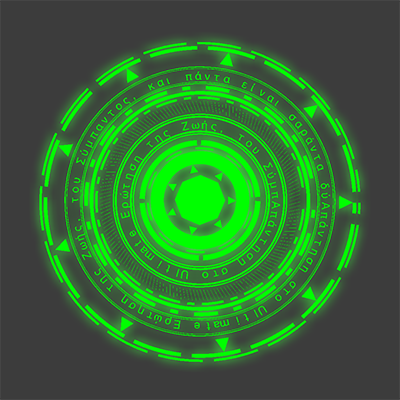
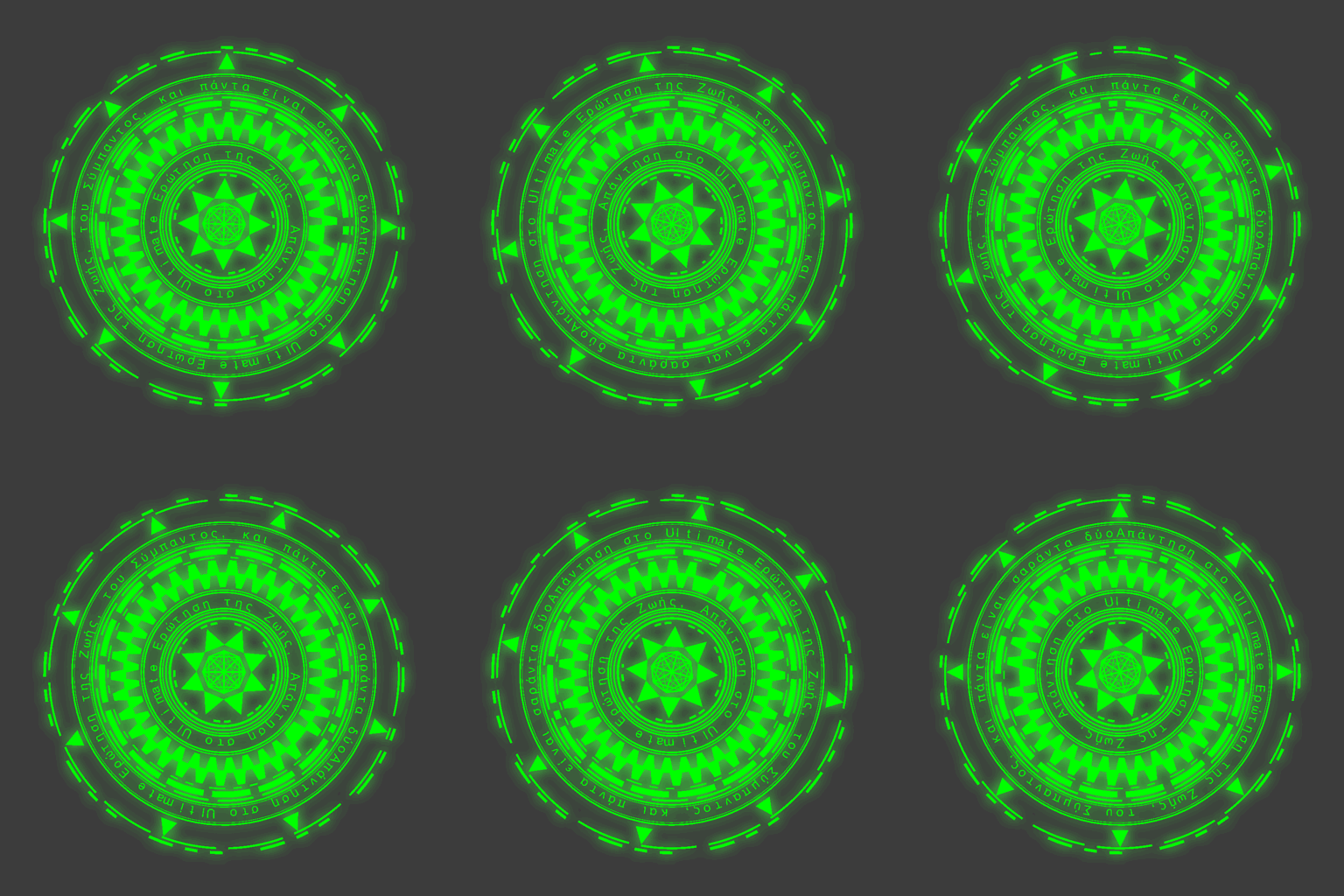
A fun app this time - MagiCirGen - a magic circle (or Mahoujin) generator.<br />
I had the general idea for long time, but finally I made it as an app.<br />
<br />
The first idea I wanted was that I just want my own auto-generated "Mahoujin". It is a kind of so called Magic Circle, western terminology, while "Mahoujin" is the Japanese terminology in a slightly different purpose. Anyway, creating the pattern by hand is fun but takes time, so I wanted to program to generate it.<br />
<br />
Then, the second idea was "Rotation in 3D". This is inspired by Pokemon Go's Pokestop. The rotating ring was cool and I wanted to generate a similar pattern.<br />
<br />
Finally, recently I saw an article regarding "Mahoujin" projecting toward ground using pocket-projector to take Magic Circle effect in a photo.<br />
It was kind of exciting, and it finally made me actually code the App to do so.<br />
<br />
It is coming soon to iOS/macOS App store.<br />
<br />
<br />
<div class="DOC_IMGBOX" style="width:300px;"><img class="DOC_IMGBOX" src="http://www.iktsoft.net/ws/f/208/1695.png" alt="" /></div><div style='clear:both;'></div><br />
<br />
<iframe width="560" height="315" src="https://www.youtube.com/embed/9y2PPfA0uOk" frameborder="0" allowfullscreen></iframe><br />
<div class="DOC_IMGBOX"><img class="DOC_IMGBOX" src="http://www.iktsoft.net/ws/f/208/1694.gif" alt="" /></div><div style='clear:both;'></div><br />
I had the general idea for long time, but finally I made it as an app.
The first idea I wanted was that I just want my own auto-generated "Mahoujin". It is a kind of so called Magic Circle, western terminology, while "Mahoujin" is the Japanese terminology in a slightly different purpose. Anyway, creating the pattern by hand is fun but takes time, so I wanted to program to generate it.
Then, the second idea was "Rotation in 3D". This is inspired by Pokemon Go's Pokestop. The rotating ring was cool and I wanted to generate a similar pattern.
Finally, recently I saw an article regarding "Mahoujin" projecting toward ground using pocket-projector to take Magic Circle effect in a photo.
It was kind of exciting, and it finally made me actually code the App to do so.
It is coming soon to iOS/macOS App store.
]]>keiji2017-06-22T06:48:00-07:00FiltSketch
http://www.iktsoft.net/keiji-en/blog/12088
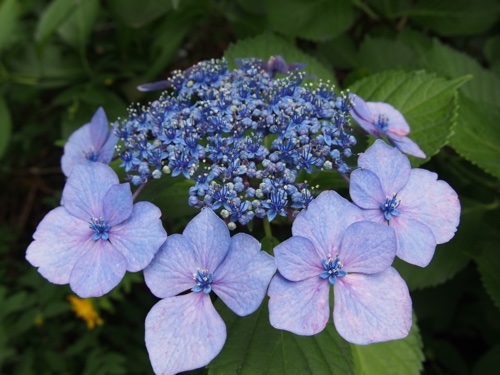
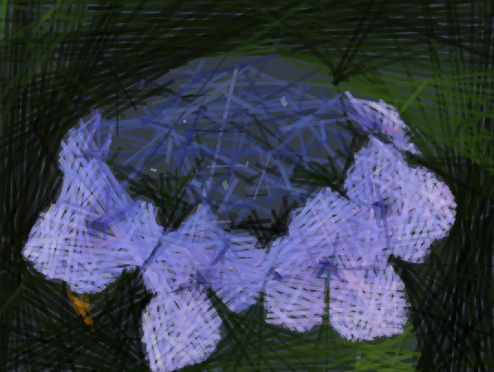
My latest project is an App called "FiltSketch", which generate an sketched image from a picture.<br />
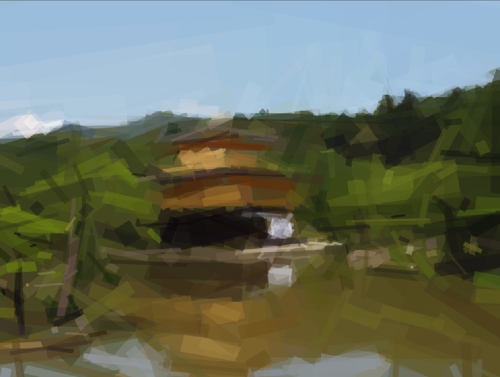
The core algorithm is an image to vector converter based on a shape evolution using Hill Climbing method. It is a kind of pattern searching in a image by trial and error.<br />
There is an already a famous App in the Mac App Store: <a class='DOC_LINK' target='_blank' href="//primitive.lol/" title="Primitive for macOS">Primitive for macOS</a>. The App is well built and very impressive.<br />
The author also has published the source code of the core algorihm: <a class='DOC_LINK' target='_blank' href="//github.com/fogleman/primitive" title="Rrimitive on GitHub">Rrimitive on GitHub</a> (go lang)<br />
<br />
My app is using the same algorithm and using the vector data to draw a paint like image. (TBD)<br />
<br />
Anyway, here are some screenshots of my first attempt of implementing the algorithm in C++11, this is so far I have achieved and satisfied with as a first phase.<br />
<br />
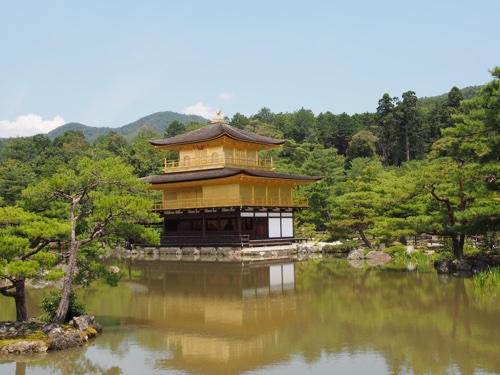
Sample#1: Original Image:<br />
<div class="DOC_IMGBOX"><img class="DOC_IMGBOX" src="http://www.iktsoft.net/ws/f/208/1681.jpg" alt="" /></div><div style='clear:both;'></div><br />
<br />
Converted:<br />
<div class="DOC_IMGBOX"><img class="DOC_IMGBOX" src="http://www.iktsoft.net/ws/f/208/1685.png" alt="" /></div><div style='clear:both;'></div><br />
<br />
Sample#2: Original Image:<br />
<div class="DOC_IMGBOX"><img class="DOC_IMGBOX" src="http://www.iktsoft.net/ws/f/208/1683.jpg" alt="" /></div><div style='clear:both;'></div><br />
<br />
Converted:<br />
<div class="DOC_IMGBOX"><img class="DOC_IMGBOX" src="http://www.iktsoft.net/ws/f/208/1686.png" alt="" /></div><div style='clear:both;'></div><br />
<br />
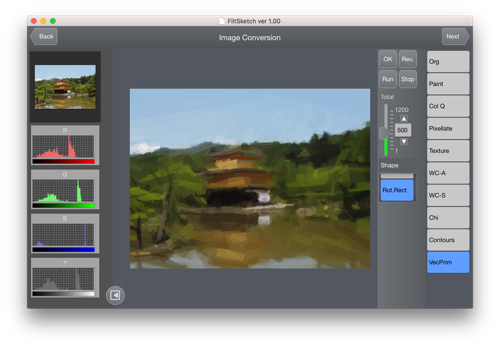
App overall UI:<br />
<div class="DOC_IMGBOX"><img class="DOC_IMGBOX" src="http://www.iktsoft.net/ws/f/208/1684.png" alt="" /></div><div style='clear:both;'></div><br />
The core algorithm is an image to vector converter based on a shape evolution using Hill Climbing method. It is a kind of pattern searching in a image by trial and error.
There is an already a famous App in the Mac App Store: Primitive for macOS. The App is well built and very impressive.
The author also has published the source code of the core algorihm: Rrimitive on GitHub (go lang)
My app is using the same algorithm and using the vector data to draw a paint like image. (TBD)
Anyway, here are some screenshots of my first attempt of implementing the algorithm in C++11, this is so far I have achieved and satisfied with as a first phase.
Sample#1: Original Image:
Converted:
Sample#2: Original Image:
Converted:
App overall UI:
]]>keiji2017-04-24T06:52:00-07:00Galaxy Spatioplotter 1.04
http://www.iktsoft.net/keiji-en/blog/12082
Galaxy Spatioplotter (macOS) 1.04 is now available. More colorful Galaxy!<br />
<br />
<a class='DOC_LINK' target='_blank' href="//itunes.apple.com/us/app/galaxy-spatioplotter/id1182826085?mt=12" title="Galaxy Spatioplotter@Mac App Store">Galaxy Spatioplotter@Mac App Store</a><br />
<br />
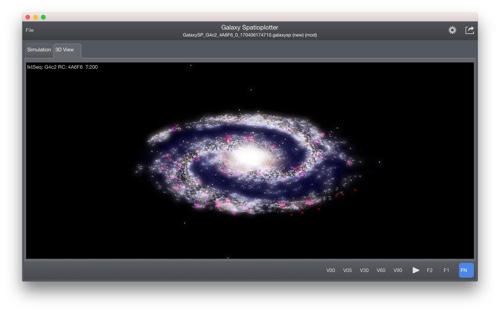
More color options to make it better looking, even though it might not reflect the actual color. I'm still struggling to create a "smoke" kind of effect of dust lane. The app uses GLSL for the volume rendering, thus it is kind of heavy program. The simulation itself should be stable.<br />
<br />
<div class="DOC_IMGBOX"><img class="DOC_IMGBOX" src="http://www.iktsoft.net/ws/f/208/1679.jpg" alt="" /></div><div style='clear:both;'></div><br />
Galaxy Spatioplotter@Mac App Store
More color options to make it better looking, even though it might not reflect the actual color. I'm still struggling to create a "smoke" kind of effect of dust lane. The app uses GLSL for the volume rendering, thus it is kind of heavy program. The simulation itself should be stable.
]]>keiji2017-04-07T06:11:00-07:00Adobe Muse
http://www.iktsoft.net/keiji-en/blog/12076
I have started working on so called "cornerstone page" for my apps, and I chose to try to use Adobe Muse.<br />
It's pretty easy to use, as long as you follow certain rule of the behavior of the software.<br />
Here are the links:<br />
<br />
<ul class='DOC_UL' ><li>
<a class='DOC_LINK' target='_blank' href="//www.stitchsketch.com/" title="StitchSketch">StitchSketch</a><br />
<li>
<a class='DOC_LINK' target='_blank' href="//spatioplotter.com/color3d/" title="Color Spatioplotter">Color Spatioplotter</a><br />
<li>
<a class='DOC_LINK' target='_blank' href="//www.spatioplotter.com/" title="Spatioplotter top">Spatioplotter top</a><br />
</ul>
<br />
Some thought:<br />
<ul class='DOC_UL' ><li>
Overall easy to use. Consistent UI throughout Adobe products.<br />
<li>
"Assets" concept is important - prepare images beforehand, and use "Place" to put images.<br />
<li>
If I use "Pin", then contents won't flow any more. This is a huge issue when I try to center any objects. I'm not sure what I'm doing wrong.<br />
<li>
To make an image "pin" to the center of the page, use text box and paste an image as an inline image, and use "wrap"/'text align" to make it center. Regular "Pin to page" won't work, but this works.<br />
</ul>
<br />
<br />
<a class='DOC_LINK' target='_blank' href="//www.lynda.com/Muse-tutorials/Muse-Essential-Training/532182-2.html" title="Muse Essential Training">Muse Essential Training</a> by Dani Beaumont on <a class='DOC_LINK' target='_blank' href="//www.lynda.com/" title="Lynda.com">Lynda.com</a> was great and very useful/helpful.<br />
It's pretty easy to use, as long as you follow certain rule of the behavior of the software.
Here are the links:
Overall easy to use. Consistent UI throughout Adobe products.
"Assets" concept is important - prepare images beforehand, and use "Place" to put images.
If I use "Pin", then contents won't flow any more. This is a huge issue when I try to center any objects. I'm not sure what I'm doing wrong.
To make an image "pin" to the center of the page, use text box and paste an image as an inline image, and use "wrap"/'text align" to make it center. Regular "Pin to page" won't work, but this works.
Muse Essential Training by Dani Beaumont on Lynda.com was great and very useful/helpful.
]]>keiji2017-03-28T05:46:00-07:00Galaxy Spatioplotter improvement
http://www.iktsoft.net/keiji-en/blog/12069
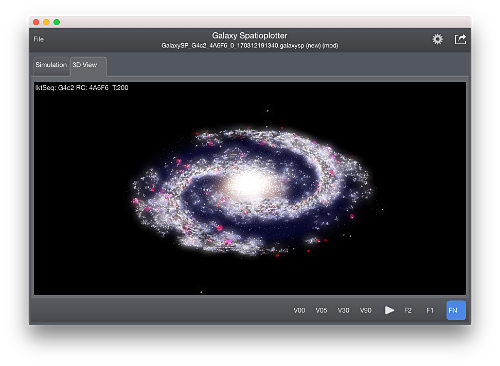
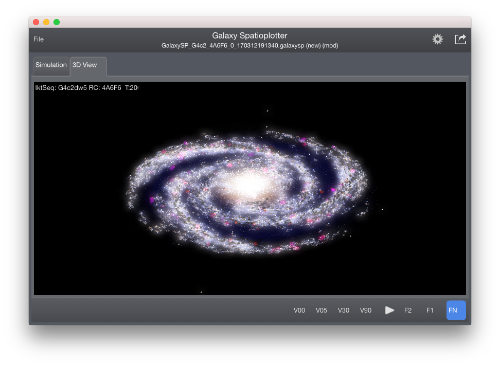
I've been working on improving the appearance of galaxies generated by Galaxy Spatioplotter.<br />
It was OK before using accurate B-V color, but not visually attractive.<br />
So, I added a little more "color" to it.<br />
I'm hoping to release this option soon.<br />
<br />
<div class="DOC_IMGBOX"><img class="DOC_IMGBOX" src="http://www.iktsoft.net/ws/f/208/1677.jpg" alt="" /></div><div style='clear:both;'></div><br />
<div class="DOC_IMGBOX"><img class="DOC_IMGBOX" src="http://www.iktsoft.net/ws/f/208/1678.jpg" alt="" /></div><div style='clear:both;'></div><br />
It was OK before using accurate B-V color, but not visually attractive.
So, I added a little more "color" to it.
I'm hoping to release this option soon.
]]>keiji2017-03-12T04:14:00-07:00Galaxy Spatioplotter introduction video
http://www.iktsoft.net/keiji-en/blog/12045
Galaxy Spatioplotter - 3D galaxy simulator/modeler - introduction video is now available.<br />
<iframe width="560" height="315" src="https://www.youtube.com/embed/MIXAhSS_RzA" frameborder="0" allowfullscreen></iframe>
]]>keiji2017-01-19T04:34:00-08:00Galaxy Spatioplotter for macOS
http://www.iktsoft.net/keiji-en/blog/12033
Galaxy Spatioplotter is now available on Apple Mac App Store:<br />
<a href="https://itunes.apple.com/us/app/galaxy-spatioplotter/id1182826085?mt=12" target='_blank'><img src="/ws/f/208/1622.png" /></a><br />
The product page is here too:<br />
<a class="DOC_LINK_INSIDE" href="http://www.iktsoft.net/tools-en/galaxysp/" title="Galaxy Spatioplotter Product Page">Galaxy Spatioplotter Product Page</a><br />
The product page is here too: Galaxy Spatioplotter Product Page
]]>keiji2016-12-22T04:03:00-08:00
 ]]>
]]>