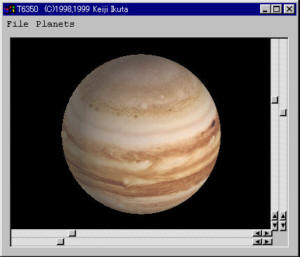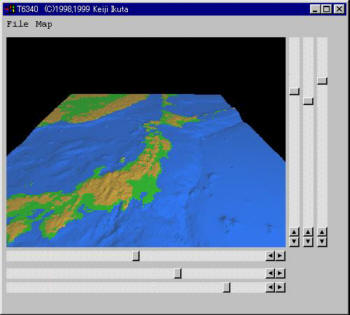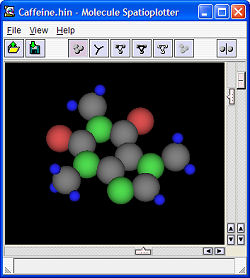
<?xml version="1.0" encoding="utf-8" ?>
<rdf:RDF   xmlns="http://purl.org/rss/1.0/"  xmlns:rdf="http://www.w3.org/1999/02/22-rdf-syntax-ns#" 	xmlns:content="http://purl.org/rss/1.0/modules/content/" 	xmlns:dc="http://purl.org/dc/elements/1.1/"   xml:lang="en">
<channel rdf:about="/keiji-en/articles/rss">
  <title>Articles/Works about my research</title>
  <link>http://www.iktsoft.net/keiji-en/articles/</link>
  <description>Articles and application programs about Software Engineering, Human-Computer Interaction, Computer Graphics, etc.</description>
  <dc:creator></dc:creator>
  <dc:date>2026-10-06T11:31:56-07:00</dc:date>
  <items>
  <rdf:Seq>
    <rdf:li rdf:resource="http://www.iktsoft.net/keiji-en/articles/5807" />
    <rdf:li rdf:resource="http://www.iktsoft.net/keiji-en/articles/7703" />
    <rdf:li rdf:resource="http://www.iktsoft.net/keiji-en/articles/4686" />
    <rdf:li rdf:resource="http://www.iktsoft.net/keiji-en/articles/4687" />
    <rdf:li rdf:resource="http://www.iktsoft.net/keiji-en/articles/5806" />
    <rdf:li rdf:resource="http://www.iktsoft.net/keiji-en/articles/5295" />
    <rdf:li rdf:resource="http://www.iktsoft.net/keiji-en/articles/4693" />
    <rdf:li rdf:resource="http://www.iktsoft.net/keiji-en/articles/6023" />
    <rdf:li rdf:resource="http://www.iktsoft.net/keiji-en/articles/6022" />
    <rdf:li rdf:resource="http://www.iktsoft.net/keiji-en/articles/6021" />
  </rdf:Seq>
  </items>
</channel>
<item rdf:about="http://www.iktsoft.net/keiji-en/articles/5807">
  <title>Molecule Spatioplotter - 3D Molecule Viewer</title>
  <link>http://www.iktsoft.net/keiji-en/articles/5807</link>
  <description>&lt;div class=&#39;DOC_H2&#39;&gt; Objective&lt;/div&gt;&lt;img  class=&quot;DOC_IMG&quot;  src=&quot;http://www.iktsoft.net/ws/f/162/689.jpg&quot; alt=&quot;&quot;  style=&quot;float:right;&quot;  /&gt;&lt;br /&gt;
This program is to read a molecule data file and display it in 3D.&lt;br /&gt;
&lt;br /&gt;
This program can load following data files:&lt;br /&gt;
&lt;ul class=&#39;DOC_UL&#39; &gt;&lt;li&gt;
 Protein Database files(*.pdb)&lt;br /&gt;
&lt;li&gt;
 Hyper-Chem files (*.hin)&lt;br /&gt;
&lt;li&gt;
 *.mld&lt;br /&gt;
&lt;li&gt;
 *.mol&lt;br /&gt;
&lt;/ul&gt;
&lt;br /&gt;
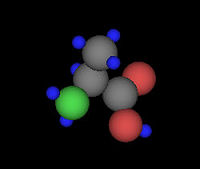
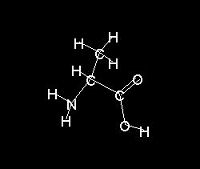
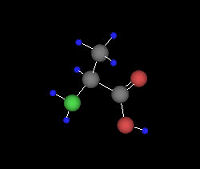
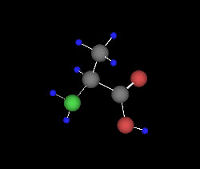
It can display molecules using six different rendering methods as shown below.&lt;br /&gt;
&lt;br /&gt;
Other features including:&lt;br /&gt;
&lt;br /&gt;
&lt;ul class=&#39;DOC_UL&#39; &gt;&lt;li&gt;
 Can save image as BMP/PNG/JPG/PCX/JPEG2000/ICO/GIF/TGA format.&lt;br /&gt;
&lt;li&gt;
 Stereo View Mode&lt;br /&gt;
&lt;li&gt;
 User definable atom definition file&lt;br /&gt;
&lt;/ul&gt;
&lt;br /&gt;
&lt;div class=&#39;DOC_H3&#39;&gt; System Requirement&lt;/div&gt;MS-Windows 2000/XP, over 800x600, full colors&lt;br /&gt;
&lt;br /&gt;
&lt;div class=&#39;DOC_H3&#39;&gt; Program Download&lt;/div&gt;&lt;a target=&#39;_blank&#39; href=&quot;http://www.iktsoft.net/download/3412/91/201/kwmsp102.zip&quot;  title=&quot;Molecule Spatioplotter ver 1.02 [kwmsp102.zip (644 KB)]&quot; &gt;&lt;img alt=&quot;Save&quot; src=&quot;/images/icon_save.gif&quot; /&gt; Molecule Spatioplotter ver 1.02 [kwmsp102.zip (644 KB)]&lt;/a&gt;&lt;br /&gt;
&lt;br /&gt;
&lt;br /&gt;
&lt;div class=&#39;DOC_H2&#39;&gt; Sample Screen Shots&lt;/div&gt;&lt;br /&gt;
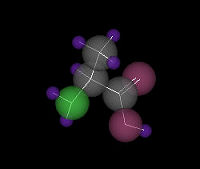
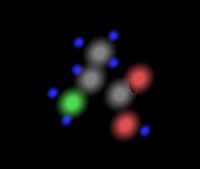
&lt;div class=&#39;DOC_H4&#39;&gt; A Sample View of Alanine&lt;/div&gt;&lt;table class=&#39;DOC_HTMLTAG&#39; cellpadding=&#39;0&#39; cellspacing=&#39;0&#39; width=&#39;95%&#39;&gt;&lt;tr class=&#39;DOC_HTMLTAG&#39;&gt;&lt;td class=&#39;DOC_HTMLTAG&#39;&gt;Solid Sphere&lt;/td class=&#39;DOC_HTMLTAG&#39;&gt;&lt;td class=&#39;DOC_HTMLTAG&#39;&gt;Line+Label&lt;/td class=&#39;DOC_HTMLTAG&#39;&gt;&lt;td class=&#39;DOC_HTMLTAG&#39;&gt;Sphere and Line &lt;/td class=&#39;DOC_HTMLTAG&#39;&gt;&lt;/tr class=&#39;DOC_HTMLTAG&#39;&gt;&lt;tr class=&#39;DOC_HTMLTAG&#39;&gt;&lt;td class=&#39;DOC_HTMLTAG&#39;&gt;&lt;div class=&quot;DOC_IMGBOX&quot;&gt;&lt;img  class=&quot;DOC_IMGBOX&quot;  src=&quot;http://www.iktsoft.net/ws/f/162/690.jpg&quot; alt=&quot;&quot;  /&gt;&lt;/div&gt;&lt;div style=&#39;clear:both;&#39;&gt;&lt;/div&gt;&lt;/td class=&#39;DOC_HTMLTAG&#39;&gt;&lt;td class=&#39;DOC_HTMLTAG&#39;&gt;&lt;div class=&quot;DOC_IMGBOX&quot;&gt;&lt;img  class=&quot;DOC_IMGBOX&quot;  src=&quot;http://www.iktsoft.net/ws/f/162/691.jpg&quot; alt=&quot;&quot;  /&gt;&lt;/div&gt;&lt;div style=&#39;clear:both;&#39;&gt;&lt;/div&gt;&lt;/td class=&#39;DOC_HTMLTAG&#39;&gt;&lt;td class=&#39;DOC_HTMLTAG&#39;&gt;&lt;div class=&quot;DOC_IMGBOX&quot;&gt;&lt;img  class=&quot;DOC_IMGBOX&quot;  src=&quot;http://www.iktsoft.net/ws/f/162/692.jpg&quot; alt=&quot;&quot;  /&gt;&lt;/div&gt;&lt;div style=&#39;clear:both;&#39;&gt;&lt;/div&gt;&lt;/td class=&#39;DOC_HTMLTAG&#39;&gt;&lt;/tr class=&#39;DOC_HTMLTAG&#39;&gt;&lt;tr class=&#39;DOC_HTMLTAG&#39;&gt;&lt;td class=&#39;DOC_HTMLTAG&#39;&gt;Sphere and Cylinder &lt;/td class=&#39;DOC_HTMLTAG&#39;&gt;&lt;td class=&#39;DOC_HTMLTAG&#39;&gt;Translucent Sphere and line &lt;/td class=&#39;DOC_HTMLTAG&#39;&gt;&lt;td class=&#39;DOC_HTMLTAG&#39;&gt;Volume Rendering &lt;/td class=&#39;DOC_HTMLTAG&#39;&gt;&lt;/tr class=&#39;DOC_HTMLTAG&#39;&gt;&lt;tr class=&#39;DOC_HTMLTAG&#39;&gt;&lt;td class=&#39;DOC_HTMLTAG&#39;&gt;&lt;div class=&quot;DOC_IMGBOX&quot;&gt;&lt;img  class=&quot;DOC_IMGBOX&quot;  src=&quot;http://www.iktsoft.net/ws/f/162/693.jpg&quot; alt=&quot;&quot;  /&gt;&lt;/div&gt;&lt;div style=&#39;clear:both;&#39;&gt;&lt;/div&gt;&lt;/td class=&#39;DOC_HTMLTAG&#39;&gt;&lt;td class=&#39;DOC_HTMLTAG&#39;&gt;&lt;div class=&quot;DOC_IMGBOX&quot;&gt;&lt;img  class=&quot;DOC_IMGBOX&quot;  src=&quot;http://www.iktsoft.net/ws/f/162/694.jpg&quot; alt=&quot;&quot;  /&gt;&lt;/div&gt;&lt;div style=&#39;clear:both;&#39;&gt;&lt;/div&gt;&lt;/td class=&#39;DOC_HTMLTAG&#39;&gt;&lt;td class=&#39;DOC_HTMLTAG&#39;&gt;&lt;div class=&quot;DOC_IMGBOX&quot;&gt;&lt;img  class=&quot;DOC_IMGBOX&quot;  src=&quot;http://www.iktsoft.net/ws/f/162/695.jpg&quot; alt=&quot;&quot;  /&gt;&lt;/div&gt;&lt;div style=&#39;clear:both;&#39;&gt;&lt;/div&gt;&lt;/td class=&#39;DOC_HTMLTAG&#39;&gt;&lt;/tr class=&#39;DOC_HTMLTAG&#39;&gt;&lt;/table class=&#39;DOC_HTMLTAG&#39;&gt;&lt;br /&gt;
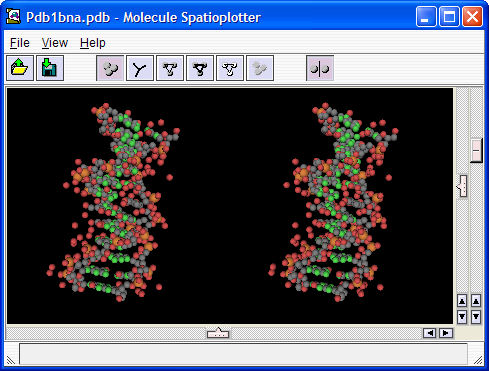
&lt;div class=&#39;DOC_H4&#39;&gt; A Stereo View Mode&lt;/div&gt;PDB data file: &quot;PDB1BNA.pdb&quot;&lt;br /&gt;
&lt;img  class=&quot;DOC_IMG&quot;  src=&quot;http://www.iktsoft.net/ws/f/162/696.jpg&quot; alt=&quot;&quot;  /&gt;&lt;br /&gt;
&lt;br /&gt;
&lt;div class=&#39;DOC_H2&#39;&gt; Acknowledgement&lt;/div&gt;&lt;ul class=&#39;DOC_UL&#39; &gt;&lt;li&gt;
 Borland C++ version 5.02J&lt;br /&gt;
&lt;li&gt;
 Microsoft Visual C++ 2005&lt;br /&gt;
&lt;li&gt;
 jpeg-6b&lt;br /&gt;
 This software is based in part on the work of the Independent JPEG Group.&lt;br /&gt;
&lt;li&gt;
 libpng: version 1.2.5&lt;br /&gt;
&lt;li&gt;
 zlib: version 1.2.1&lt;br /&gt;
&lt;li&gt;
 libtiff: version 3.5.7&lt;br /&gt;
&lt;li&gt;
 JasPer: IMAGE POWER JPEG-2000&lt;br /&gt;
&lt;li&gt;
 CxImage: version 5.99c&lt;br /&gt;
&lt;/ul&gt;
&lt;br /&gt;
&lt;div class=&#39;DOC_H2&#39;&gt; Resources&lt;/div&gt;&lt;ul class=&#39;DOC_UL&#39; &gt;&lt;li&gt;
 PDB: Protein Data Bank (*.pdb)&lt;br /&gt;
 &lt;a class=&#39;DOC_LINK&#39; target=&#39;_blank&#39; href=&quot;http://www.rcsb.org/pdb/&quot; title=&quot;http://www.rcsb.org/pdb/&quot;&gt;http://www.rcsb.org/pdb/&lt;/a&gt;&lt;br /&gt;
&lt;li&gt;
 HIN: HyperChem package has *.HIM files.&lt;br /&gt;
 It used to have lots of data in the trial version package. I don&#39;t know current version, but maybe.&lt;br /&gt;
 &lt;a class=&#39;DOC_LINK&#39; target=&#39;_blank&#39; href=&quot;http://www.hyper.com/&quot; title=&quot;http://www.hyper.com/&quot;&gt;http://www.hyper.com/&lt;/a&gt;&lt;br /&gt;
&lt;li&gt;
 MOL :&lt;br /&gt;
&lt;li&gt;
 MLD: MOLDA package comes with tons of molecule data file (*.mld).&lt;br /&gt;
 MOLDA for Windows&lt;br /&gt;
&lt;li&gt;
 Protein Explorer &lt;a class=&#39;DOC_LINK&#39; target=&#39;_blank&#39; href=&quot;//www.umass.edu/microbio/chime/pe/protexpl/frntdoor.htm&quot; title=&quot;proteinexplorer.org&quot;&gt;proteinexplorer.org&lt;/a&gt;&lt;br /&gt;
&lt;/ul&gt;</description>
<content:encoded><![CDATA[<div class='DOC_H2'> Objective</div><img  class="DOC_IMG"  src="http://www.iktsoft.net/ws/f/162/689.jpg" alt=""  style="float:right;"  /><br />
This program is to read a molecule data file and display it in 3D.<br />
<br />
This program can load following data files:<br />
<ul class='DOC_UL' ><li>
 Protein Database files(*.pdb)<br />
<li>
 Hyper-Chem files (*.hin)<br />
<li>
 *.mld<br />
<li>
 *.mol<br />
</ul>
<br />
It can display molecules using six different rendering methods as shown below.<br />
<br />
Other features including:<br />
<br />
<ul class='DOC_UL' ><li>
 Can save image as BMP/PNG/JPG/PCX/JPEG2000/ICO/GIF/TGA format.<br />
<li>
 Stereo View Mode<br />
<li>
 User definable atom definition file<br />
</ul>
<br />
<div class='DOC_H3'> System Requirement</div>MS-Windows 2000/XP, over 800x600, full colors<br />
<br />
<div class='DOC_H3'> Program Download</div><a target='_blank' href="http://www.iktsoft.net/download/3412/91/201/kwmsp102.zip"  title="Molecule Spatioplotter ver 1.02 [kwmsp102.zip (644 KB)]" ><img alt="Save" src="/images/icon_save.gif" /> Molecule Spatioplotter ver 1.02 [kwmsp102.zip (644 KB)]</a><br />
<br />
<br />
<div class='DOC_H2'> Sample Screen Shots</div><br />
<div class='DOC_H4'> A Sample View of Alanine</div><table class='DOC_HTMLTAG' cellpadding='0' cellspacing='0' width='95%'><tr class='DOC_HTMLTAG'><td class='DOC_HTMLTAG'>Solid Sphere</td class='DOC_HTMLTAG'><td class='DOC_HTMLTAG'>Line+Label</td class='DOC_HTMLTAG'><td class='DOC_HTMLTAG'>Sphere and Line </td class='DOC_HTMLTAG'></tr class='DOC_HTMLTAG'><tr class='DOC_HTMLTAG'><td class='DOC_HTMLTAG'><div class="DOC_IMGBOX"><img  class="DOC_IMGBOX"  src="http://www.iktsoft.net/ws/f/162/690.jpg" alt=""  /></div><div style='clear:both;'></div></td class='DOC_HTMLTAG'><td class='DOC_HTMLTAG'><div class="DOC_IMGBOX"><img  class="DOC_IMGBOX"  src="http://www.iktsoft.net/ws/f/162/691.jpg" alt=""  /></div><div style='clear:both;'></div></td class='DOC_HTMLTAG'><td class='DOC_HTMLTAG'><div class="DOC_IMGBOX"><img  class="DOC_IMGBOX"  src="http://www.iktsoft.net/ws/f/162/692.jpg" alt=""  /></div><div style='clear:both;'></div></td class='DOC_HTMLTAG'></tr class='DOC_HTMLTAG'><tr class='DOC_HTMLTAG'><td class='DOC_HTMLTAG'>Sphere and Cylinder </td class='DOC_HTMLTAG'><td class='DOC_HTMLTAG'>Translucent Sphere and line </td class='DOC_HTMLTAG'><td class='DOC_HTMLTAG'>Volume Rendering </td class='DOC_HTMLTAG'></tr class='DOC_HTMLTAG'><tr class='DOC_HTMLTAG'><td class='DOC_HTMLTAG'><div class="DOC_IMGBOX"><img  class="DOC_IMGBOX"  src="http://www.iktsoft.net/ws/f/162/693.jpg" alt=""  /></div><div style='clear:both;'></div></td class='DOC_HTMLTAG'><td class='DOC_HTMLTAG'><div class="DOC_IMGBOX"><img  class="DOC_IMGBOX"  src="http://www.iktsoft.net/ws/f/162/694.jpg" alt=""  /></div><div style='clear:both;'></div></td class='DOC_HTMLTAG'><td class='DOC_HTMLTAG'><div class="DOC_IMGBOX"><img  class="DOC_IMGBOX"  src="http://www.iktsoft.net/ws/f/162/695.jpg" alt=""  /></div><div style='clear:both;'></div></td class='DOC_HTMLTAG'></tr class='DOC_HTMLTAG'></table class='DOC_HTMLTAG'><br />
<div class='DOC_H4'> A Stereo View Mode</div>PDB data file: "PDB1BNA.pdb"<br />
<img  class="DOC_IMG"  src="http://www.iktsoft.net/ws/f/162/696.jpg" alt=""  /><br />
<br />
<div class='DOC_H2'> Acknowledgement</div><ul class='DOC_UL' ><li>
 Borland C++ version 5.02J<br />
<li>
 Microsoft Visual C++ 2005<br />
<li>
 jpeg-6b<br />
 This software is based in part on the work of the Independent JPEG Group.<br />
<li>
 libpng: version 1.2.5<br />
<li>
 zlib: version 1.2.1<br />
<li>
 libtiff: version 3.5.7<br />
<li>
 JasPer: IMAGE POWER JPEG-2000<br />
<li>
 CxImage: version 5.99c<br />
</ul>
<br />
<div class='DOC_H2'> Resources</div><ul class='DOC_UL' ><li>
 PDB: Protein Data Bank (*.pdb)<br />
 <a class='DOC_LINK' target='_blank' href="http://www.rcsb.org/pdb/" title="http://www.rcsb.org/pdb/">http://www.rcsb.org/pdb/</a><br />
<li>
 HIN: HyperChem package has *.HIM files.<br />
 It used to have lots of data in the trial version package. I don't know current version, but maybe.<br />
 <a class='DOC_LINK' target='_blank' href="http://www.hyper.com/" title="http://www.hyper.com/">http://www.hyper.com/</a><br />
<li>
 MOL :<br />
<li>
 MLD: MOLDA package comes with tons of molecule data file (*.mld).<br />
 MOLDA for Windows<br />
<li>
 Protein Explorer <a class='DOC_LINK' target='_blank' href="//www.umass.edu/microbio/chime/pe/protexpl/frntdoor.htm" title="proteinexplorer.org">proteinexplorer.org</a><br />
</ul>]]></content:encoded>
 	<dc:creator>keiji</dc:creator>
	<dc:date>2006-02-01T11:02:00-08:00</dc:date>
</item>
<item rdf:about="http://www.iktsoft.net/keiji-en/articles/7703">
  <title>Boundary Mathematics</title>
  <link>http://www.iktsoft.net/keiji-en/articles/7703</link>
  <description>&lt;div class=&#39;DOC_H2&#39;&gt; Objective&lt;/div&gt;When I first studied Boundary Mathematics in math class, I though it is just a kind of technique to solve formal logic. But after having taken several classes taught by Dr. Bricken, I realized that it is very fascinating concept to change the view of the Universe.&lt;br /&gt;
I&#39;ve decided to continue to study Boundary Mathematics. Here I&#39;ll try to explain its basic concept.&lt;br /&gt;
&lt;br /&gt;
&lt;div class=&#39;DOC_H2&#39;&gt;  Starting Point&lt;/div&gt;The Boundary Mathematics, which was invented and developed by Dr. William Bricken, bases upon Laws of Form published in 1969 by George Spencer-Brown.&lt;br /&gt;
&lt;br /&gt;
&lt;div class=&#39;DOC_H3&#39;&gt; Basic&lt;/div&gt;The basic concept of Laws of Form is Distinction from void.&lt;br /&gt;
First, there is a void:&lt;br /&gt;
&lt;br /&gt;
Void:	&lt;img  class=&quot;DOC_IMGINLINE&quot;  src=&quot;http://www.iktsoft.net/ws/f/162/867.gif&quot; alt=&quot;&quot;  /&gt;&lt;br /&gt;
&lt;br /&gt;
Then, &quot;boundary&quot; to distinct something.&lt;br /&gt;
&lt;br /&gt;
Boundary:  &lt;img  class=&quot;DOC_IMGINLINE&quot;  src=&quot;http://www.iktsoft.net/ws/f/162/868.gif&quot; alt=&quot;&quot;  /&gt;&lt;br /&gt;
&lt;br /&gt;
You can see a region distinguished from void. There is no previous principles. There is only &quot;Boundary&quot;&lt;br /&gt;
&lt;br /&gt;
Next, there are two possibilities to place another boundary:&lt;br /&gt;
&lt;br /&gt;
Next to previous boundary:	 &lt;img  class=&quot;DOC_IMGINLINE&quot;  src=&quot;http://www.iktsoft.net/ws/f/162/868.gif&quot; alt=&quot;&quot;  /&gt; &lt;img  class=&quot;DOC_IMGINLINE&quot;  src=&quot;http://www.iktsoft.net/ws/f/162/868.gif&quot; alt=&quot;&quot;  /&gt;&lt;br /&gt;
&lt;br /&gt;
Inside of previous boundary:	 &lt;img  class=&quot;DOC_IMGINLINE&quot;  src=&quot;http://www.iktsoft.net/ws/f/162/869.gif&quot; alt=&quot;&quot;  /&gt;&lt;br /&gt;
&lt;br /&gt;
&lt;div class=&#39;DOC_H3&#39;&gt; Axioms&lt;/div&gt;There are two basic axioms:&lt;br /&gt;
&lt;br /&gt;
Calling:	 &lt;img  class=&quot;DOC_IMGINLINE&quot;  src=&quot;http://www.iktsoft.net/ws/f/162/868.gif&quot; alt=&quot;&quot;  /&gt; &lt;img  class=&quot;DOC_IMGINLINE&quot;  src=&quot;http://www.iktsoft.net/ws/f/162/868.gif&quot; alt=&quot;&quot;  /&gt; =	 &lt;img  class=&quot;DOC_IMGINLINE&quot;  src=&quot;http://www.iktsoft.net/ws/f/162/868.gif&quot; alt=&quot;&quot;  /&gt;&lt;br /&gt;
&lt;br /&gt;
Crossing:	 &lt;img  class=&quot;DOC_IMGINLINE&quot;  src=&quot;http://www.iktsoft.net/ws/f/162/869.gif&quot; alt=&quot;&quot;  /&gt; = &lt;img  class=&quot;DOC_IMGINLINE&quot;  src=&quot;http://www.iktsoft.net/ws/f/162/867.gif&quot; alt=&quot;&quot;  /&gt;&lt;br /&gt;
&lt;br /&gt;
This is a basic method to reduce complex structure into simple one.&lt;br /&gt;
&lt;br /&gt;
&lt;div class=&#39;DOC_H2&#39;&gt; New Logic&lt;/div&gt;I&#39;m sorry, but further information is under construction.&lt;br /&gt;
&lt;br /&gt;
&lt;div class=&#39;DOC_H2&#39;&gt; References&lt;/div&gt;&lt;div class=&#39;DOC_AMAZON_BOX&#39; style=&#39;float:right&#39;&gt;&lt;iframe src=&quot;https://rcm.amazon.com/e/cm?t=taktranet-20&amp;o=1&amp;p=8&amp;l=as1&amp;asins=0963989901&amp;fc1=000000&amp;IS2=1&amp;lt1=_blank&amp;lc1=0000FF&amp;bc1=AAAAAA&amp;bg1=FFFFFF&amp;m=amazon&amp;f=ifr&quot; style=&quot;width:120px;height:240px;&quot; scrolling=&quot;no&quot; marginwidth=&quot;0&quot; marginheight=&quot;0&quot; frameborder=&quot;0&quot;&gt;&lt;/iframe&gt;&lt;/div&gt;&lt;br /&gt;
&lt;ul class=&#39;DOC_UL&#39; &gt;&lt;li&gt;
 George Spencer-Brown, Laws of Form. 1994. ISBN:0-9639899-0-1&lt;br /&gt;
&lt;li&gt;
 Boundary Institute for the Study of Foundations &lt;a class=&#39;DOC_LINK&#39; target=&#39;_blank&#39; href=&quot;http://www.boundaryinstitute.org/&quot; title=&quot;http://www.boundaryinstitute.org/&quot;&gt;http://www.boundaryinstitute.org/&lt;/a&gt;&lt;br /&gt;
&lt;li&gt;
 Dr. William Bricken&#39;s Homepage &lt;a class=&#39;DOC_LINK&#39; target=&#39;_blank&#39; href=&quot;http://wbricken.com/index.html&quot; title=&quot;http://wbricken.com/index.html&quot;&gt;http://wbricken.com/index.html&lt;/a&gt;&lt;br /&gt;
&lt;/ul&gt;</description>
<content:encoded><![CDATA[<div class='DOC_H2'> Objective</div>When I first studied Boundary Mathematics in math class, I though it is just a kind of technique to solve formal logic. But after having taken several classes taught by Dr. Bricken, I realized that it is very fascinating concept to change the view of the Universe.<br />
I've decided to continue to study Boundary Mathematics. Here I'll try to explain its basic concept.<br />
<br />
<div class='DOC_H2'>  Starting Point</div>The Boundary Mathematics, which was invented and developed by Dr. William Bricken, bases upon Laws of Form published in 1969 by George Spencer-Brown.<br />
<br />
<div class='DOC_H3'> Basic</div>The basic concept of Laws of Form is Distinction from void.<br />
First, there is a void:<br />
<br />
Void:	<img  class="DOC_IMGINLINE"  src="http://www.iktsoft.net/ws/f/162/867.gif" alt=""  /><br />
<br />
Then, "boundary" to distinct something.<br />
<br />
Boundary:  <img  class="DOC_IMGINLINE"  src="http://www.iktsoft.net/ws/f/162/868.gif" alt=""  /><br />
<br />
You can see a region distinguished from void. There is no previous principles. There is only "Boundary"<br />
<br />
Next, there are two possibilities to place another boundary:<br />
<br />
Next to previous boundary:	 <img  class="DOC_IMGINLINE"  src="http://www.iktsoft.net/ws/f/162/868.gif" alt=""  /> <img  class="DOC_IMGINLINE"  src="http://www.iktsoft.net/ws/f/162/868.gif" alt=""  /><br />
<br />
Inside of previous boundary:	 <img  class="DOC_IMGINLINE"  src="http://www.iktsoft.net/ws/f/162/869.gif" alt=""  /><br />
<br />
<div class='DOC_H3'> Axioms</div>There are two basic axioms:<br />
<br />
Calling:	 <img  class="DOC_IMGINLINE"  src="http://www.iktsoft.net/ws/f/162/868.gif" alt=""  /> <img  class="DOC_IMGINLINE"  src="http://www.iktsoft.net/ws/f/162/868.gif" alt=""  /> =	 <img  class="DOC_IMGINLINE"  src="http://www.iktsoft.net/ws/f/162/868.gif" alt=""  /><br />
<br />
Crossing:	 <img  class="DOC_IMGINLINE"  src="http://www.iktsoft.net/ws/f/162/869.gif" alt=""  /> = <img  class="DOC_IMGINLINE"  src="http://www.iktsoft.net/ws/f/162/867.gif" alt=""  /><br />
<br />
This is a basic method to reduce complex structure into simple one.<br />
<br />
<div class='DOC_H2'> New Logic</div>I'm sorry, but further information is under construction.<br />
<br />
<div class='DOC_H2'> References</div><div class='DOC_AMAZON_BOX' style='float:right'><iframe src="https://rcm.amazon.com/e/cm?t=taktranet-20&o=1&p=8&l=as1&asins=0963989901&fc1=000000&IS2=1&lt1=_blank&lc1=0000FF&bc1=AAAAAA&bg1=FFFFFF&m=amazon&f=ifr" style="width:120px;height:240px;" scrolling="no" marginwidth="0" marginheight="0" frameborder="0"></iframe></div><br />
<ul class='DOC_UL' ><li>
 George Spencer-Brown, Laws of Form. 1994. ISBN:0-9639899-0-1<br />
<li>
 Boundary Institute for the Study of Foundations <a class='DOC_LINK' target='_blank' href="http://www.boundaryinstitute.org/" title="http://www.boundaryinstitute.org/">http://www.boundaryinstitute.org/</a><br />
<li>
 Dr. William Bricken's Homepage <a class='DOC_LINK' target='_blank' href="http://wbricken.com/index.html" title="http://wbricken.com/index.html">http://wbricken.com/index.html</a><br />
</ul>]]></content:encoded>
 	<dc:creator>keiji</dc:creator>
	<dc:date>2004-02-02T07:32:00-08:00</dc:date>
</item>
<item rdf:about="http://www.iktsoft.net/keiji-en/articles/4686">
  <title>Human-Computer Interaction</title>
  <link>http://www.iktsoft.net/keiji-en/articles/4686</link>
  <description>&lt;div class=&#39;DOC_H2&#39;&gt; 1. Objective&lt;/div&gt;Complex software user intercaces have been becoming a serious problem recently, as many people who are not computer specialists begin to use software. There are several reasons for these problems, such as little recognition in the software industry of the need for interface design, lack of principles of interface, and lack of interdisciplinary study of human-computer interface.&lt;br /&gt;
&lt;br /&gt;
Because I have devoted myself to developing information systems for many years, I have strong concerns about the Graphical User Interface (GUI) design for applications on the Windows system. To improve software quality, I wanted to know recent studies of design principles, an endorsement of those axioms based on not only empirical, but also logical and psychological points of view. Here I would like to discuss some guidelines to be considered when designing a software interface.&lt;br /&gt;
&lt;br /&gt;
&lt;div class=&#39;DOC_H2&#39;&gt; 2. My Opinion About GUI&lt;/div&gt;Is it true that a GUI is always easy to use? I don&#39;t think so. It is true for some kind of applications such as painting software, but business applications, such as data entry systems, need a more easy-to-enter interface. The Web systems based on an Internet browser are not sufficient in the aspect of user interface because of the immaturity of a browser&#39;s functionalities. An internet browser should contain functions to advance usability. I think that the GUI and the Character User Interface (CUI) should be merged.&lt;br /&gt;
&lt;br /&gt;
I was strongly inspired by these books:&lt;br /&gt;
&lt;br /&gt;
&lt;ul class=&#39;DOC_UL&#39; &gt;&lt;li&gt;
 Cooper, Alan. About Face: The Essentials of User Interface Design. (Foster City, CA: IDG Books Worldwide, 1995)&lt;br /&gt;
&lt;li&gt;
 Norman, Donald A. The Design of Everyday Things. (New York: Doubleday, 1990)&lt;br /&gt;
&lt;/ul&gt;
I strongly recommend that all software engineers read these books.&lt;br /&gt;
&lt;br /&gt;
&lt;br /&gt;
&lt;div class=&#39;DOC_H2&#39;&gt; 3. Principles for Designing User Interface&lt;/div&gt;Based on study of the above books, I have concluded there are six categories we should consider when designing an interface.&lt;br /&gt;
&lt;br /&gt;
&lt;div class=&#39;DOC_H3&#39;&gt; 3.1 User&#39;s Goal&lt;/div&gt;We always have to keep in mind that the goal of the user&#39;s task is primary. The reason the application software exists is to achieve a user&#39;s aim by providing functionalities. That is, it is obvious there is no reason for an application to exist if it fails to provide proper functions to a user. Important points:&lt;br /&gt;
&lt;br /&gt;
&lt;ul class=&#39;DOC_UL&#39; &gt;&lt;li&gt;
 A software design must be based not on features but on the user&#39;s tasks. To achieve this purpose, I think we should describe the task-function relationship. All functions have to belong to at least one task.&lt;br /&gt;
&lt;li&gt;
 We should provide several methods to complete a task. I agree with the point that within a flow of functions, an operation should produce one result.&lt;br /&gt;
&lt;li&gt;
 I agree with Raskin&#39;s view, &quot;A well-designed and humane interface doesn&#39;t have to be split into beginner and expert subsystems.&quot; (Raskin, 2000, p.70) Providing several methods to do a task will help a user transit from beginner to expert.&lt;br /&gt;
&lt;li&gt;
 I think we also have to have a measure to quantify the distance between a user&#39;s goal and a presented goal provided by a program.&lt;br /&gt;
&lt;/ul&gt;
&lt;br /&gt;
&lt;div class=&#39;DOC_H3&#39;&gt; 3.2. Software&#39;s role&lt;/div&gt;It is obvious that a program&#39;s role is to assist in the user&#39;s task toward achieving a goal. A program should be a guide or a tutor for users. Therefore, a program has to have the ability to help users. For example, a program should provide proper tools, demonstrate a user the proper way to navigate a program, and remember everything for users.&lt;br /&gt;
&lt;br /&gt;
&lt;div class=&#39;DOC_H3&#39;&gt; 3.3. Evaluation of an interfaceAn interface must be tested and evaluated. There are some measures of this:&lt;/div&gt;&lt;br /&gt;
&lt;ul class=&#39;DOC_UL&#39; &gt;&lt;li&gt;
 Time to perform&lt;br /&gt;
&lt;li&gt;
 A structure and steps to perform&lt;br /&gt;
&lt;li&gt;
 A proper report&lt;br /&gt;
&lt;li&gt;
 A distance between goal and implementation&lt;br /&gt;
&lt;/ul&gt;
&lt;br /&gt;
&lt;div class=&#39;DOC_H3&#39;&gt; 3.4. Affordance and Navigation&lt;/div&gt;There are two roles for a rich visual appearance in user interface. They are:&lt;br /&gt;
&lt;br /&gt;
&lt;ol class=&#39;DOC_OL&#39; &gt;&lt;li&gt;
 To indicate to users that there are functions in the program.&lt;br /&gt;
&lt;li&gt;
 To give a guide to performing the task and the flow of functions.&lt;br /&gt;
&lt;/ol&gt;
&lt;br /&gt;
A functions&#39; only reason to exist is to be used by users. According to the role of software, it should have proper visual feedback to assist the users&#39; tasks. Therefore, a function should have an explicit visual clue to be noticed by users. There are several types of these implications.&lt;br /&gt;
&lt;br /&gt;
&lt;ol class=&#39;DOC_OL&#39; &gt;&lt;li&gt;
 &lt;em&gt;Affordance&lt;/em&gt; (Norman, 1999)&lt;br /&gt;
 &quot;The required information was in the world: the appearance of the device could provide the critical clues required for its proper operation.&quot;(Norman, 1999) The Affordance is a natural property that the object has in the physical world. In this sense, there is no real Affordance in software.&lt;br /&gt;
&lt;li&gt;
 &lt;em&gt;Constraint&lt;/em&gt; (Norman, 1999)&lt;br /&gt;
 There are three constraints. Physical constraint limits the user&#39;s behavior physically. Logical constraint limits the user&#39;s behavior by indicating a user clue which makes user logically aware of the limitation. Cultural constraint is formed in the culture. It provides many conventions to the user.&lt;br /&gt;
&lt;li&gt;
 &lt;em&gt;Convention&lt;/em&gt; (Norman, 1999)&lt;br /&gt;
 This is cultural constraint. &quot;There is nothing inherent in the devices or design that requires the system to act in this way.&quot; (Norman, 1999) That is, every interface is artificial. If it becomes easier and easier, it becomes natural and intuitive. &quot;The term natural equates to very easy to learn.&quot; (Raskin, 2000, p.150)&lt;br /&gt;
&lt;/ol&gt;
&lt;br /&gt;
In addition, I think we should consider &quot;assistance.&quot; We create a program as a new tool. That is, users have to learn how to use the program every time. Furthermore a computer can do tasks completely precisely, but a human being can&#39;t. Therefore, a program should assist users.&lt;br /&gt;
&lt;br /&gt;
&lt;div class=&#39;DOC_H3&#39;&gt; 3.5. User&#39;s Locus of Attention and cognitive flow&lt;/div&gt;&lt;div class=&#39;DOC_H4&#39;&gt; 3.5.1. The Locus of Attention&lt;/div&gt;We have to be careful of the user&#39;s &quot;Locus of Attention&quot;(Raskin, 2000) when designing the interface flow. The Locus of Attention is defined as &quot;... a feature or an object in the physical world or an idea about which you are intently and actively thinking.&quot; (Raskin, 2000, p.17) According to the neurophysiology, what a human being percieve, even though the signal was conveyed to brain, doesn&#39;t mean it is noticed. (Raskin, 2000, p.17) That is, &quot;Perceptions don&#39;t automatically become memories.&quot; (Raskin, 2000, p.18) Therefore an interface should keep the user&#39;s Locus of Attention when interacting with users. A message, a flow of operation, should be within the user&#39;s Locus of Attention. It is important to recognize that a user has only one locus of attention at a time. (Raskin, 2000, p.24)&lt;br /&gt;
&lt;br /&gt;
&lt;div class=&#39;DOC_H4&#39;&gt; 3.5.2. Habit&lt;/div&gt;&quot;With repetition, or practice, your competence becomes habitual, and you can do the task without having to think about it.&quot; (Raskin, 2000, p.19) &quot;The more predictable, automatic, and unconscious a task becomes, the less it will degrade or compete with other tasks.&quot;(Baars 1988, p.33 cited by Raskin, 2000, p.21) I think the operations should be simple enough that they can potentially become automatic for the users. There are four things that are essential for a task to become automatic for users:&lt;br /&gt;
&lt;br /&gt;
&lt;ol class=&#39;DOC_OL&#39; &gt;&lt;li&gt;
 Users should be able to control the operation&lt;br /&gt;
&lt;li&gt;
 A program must not interrupt a user&#39;s operation&lt;br /&gt;
&lt;li&gt;
 The steps must be predictable&lt;br /&gt;
&lt;li&gt;
 The task should be a skill that can be acquired through practice.&lt;br /&gt;
&lt;/ol&gt;
&lt;br /&gt;
&lt;div class=&#39;DOC_H4&#39;&gt; 3.5.3. Mode&lt;/div&gt;A user&#39;s operation is defined as a gesture, which is defined as &quot;a sequence of human actions completed automatically once set in motion.&quot; (Raskin, 2000, p.37) A definition of Mode is &quot;A human-machine interface is modal with respect to a given gesture when (1) the current state of the interface is not the user&#39;s locus of attention and (2) the interface will execute one among several different possible responses to the gesture, depending on the system&#39;s current state.&quot; (Raskin, 2000, p.42) We should eliminate a &quot;Mode&quot; for the following reasons:&lt;br /&gt;
&lt;br /&gt;
&lt;ul class=&#39;DOC_UL&#39; &gt;&lt;li&gt;
 It requires users to keep current Mode. But human being can&#39;t do things simultaneously; a user will lose current Mode. This causes operation error.&lt;br /&gt;
&lt;li&gt;
 Even if a program makes a proper feedback of mode, when users are concentrating on their task, they will make a mis-operation.&lt;br /&gt;
&lt;li&gt;
 The more the numbers of mode increase, the more users have to remember the meaning of gesture in each mode. This will increase user&#39;s effort to use a program.&lt;br /&gt;
&lt;/ul&gt;
&lt;br /&gt;
From the conventional point of view, there is mode in the certain applications such as painting programs. The tool-selection-mode is an established convention in the software industry; therefore we can use it on the condition that a program offers a proper visual feedback.&lt;br /&gt;
&lt;br /&gt;
&lt;div class=&#39;DOC_H3&#39;&gt; 3.6. Visual Communication&lt;/div&gt;I agree with an economical approach to analyzing human factors in a user interface. (Vicente, 1990) I think a visual layout is a kind of environment, and therefore the description of it as a working domain is important; because the behavior of a user is highly constrained by the environment.&lt;br /&gt;
&lt;br /&gt;
&lt;div class=&#39;DOC_H2&#39;&gt; 4. Further Study&lt;/div&gt;I plan to study the following subjects:&lt;br /&gt;
&lt;br /&gt;
&lt;ul class=&#39;DOC_UL&#39; &gt;&lt;li&gt;
 The way to describe an interface as combination of atoms, which are defined as basic unit of interface. This is based on the principle from the statement that &quot;any objects that look the same are the same.&quot; (Raskin, 2000, p.102)&lt;br /&gt;
&lt;li&gt;
 The method to quantify the quality of a user interface.&lt;br /&gt;
&lt;li&gt;
 The mechanism that how GUI and a language can help each other. This is based on the statement that &quot;We need tools that are driven by language and abstraction, not by touch.&quot; (Bricken, 2000) I believe that every application program should have a language (i.e. scripting) to communicate with users. A language and a graphical user interface should be reciprocal.&lt;br /&gt;
&lt;/ul&gt;
&lt;br /&gt;
&lt;div class=&#39;DOC_H2&#39;&gt; 5. Reference&lt;/div&gt;I recommend these books for designing software.&lt;br /&gt;
&lt;br /&gt;
&lt;ul class=&#39;DOC_UL&#39; &gt;&lt;li&gt;
 Cooper, Alan. About Face: The Essentials of User Interface Design. (Foster City, CA: IDG Books Worldwide, 1995)&lt;br /&gt;
 ==&amp;gt; About Face 3: The Essentials of Interaction Design (Paperback) ISBN:0470084111&lt;br /&gt;
&lt;li&gt;
 Mullet, Kevin. Sano, Darrell. Designing Visual Interfaces: Communication Oriented Techniques. (Mountain View, CA: SunSoft Press, 1995) ISBN:0133033899&lt;br /&gt;
&lt;li&gt;
 Norman, Donald A. The Design of Everyday Things. (New York: Doubleday, 1990) ISBN:0465067107&lt;br /&gt;
&lt;li&gt;
 Raskin, Jef. The Humane Interface. (Stoughton, MA: ACM Press, 2000) ISBN:0201379376&lt;br /&gt;
&lt;li&gt;
 Vicente, Kim J. &quot;A Few Implications of an Ecological Approach to Human Factors&quot; Human Factors Society Bulletin 33:11, pp.1-4 (Nov. 1990)&lt;br /&gt;
&lt;/ul&gt;
&lt;br /&gt;
&lt;div class=&#39;DOC_AMAZON_BOX&#39;&gt;&lt;iframe src=&quot;https://rcm.amazon.com/e/cm?t=taktranet-20&amp;o=1&amp;p=8&amp;l=as1&amp;asins=0470084111&amp;fc1=000000&amp;IS2=1&amp;lt1=_blank&amp;lc1=0000FF&amp;bc1=AAAAAA&amp;bg1=FFFFFF&amp;m=amazon&amp;f=ifr&quot; style=&quot;width:120px;height:240px;&quot; scrolling=&quot;no&quot; marginwidth=&quot;0&quot; marginheight=&quot;0&quot; frameborder=&quot;0&quot;&gt;&lt;/iframe&gt;&lt;/div&gt;&lt;div class=&#39;DOC_AMAZON_BOX&#39;&gt;&lt;iframe src=&quot;https://rcm.amazon.com/e/cm?t=taktranet-20&amp;o=1&amp;p=8&amp;l=as1&amp;asins=0133033899&amp;fc1=000000&amp;IS2=1&amp;lt1=_blank&amp;lc1=0000FF&amp;bc1=AAAAAA&amp;bg1=FFFFFF&amp;m=amazon&amp;f=ifr&quot; style=&quot;width:120px;height:240px;&quot; scrolling=&quot;no&quot; marginwidth=&quot;0&quot; marginheight=&quot;0&quot; frameborder=&quot;0&quot;&gt;&lt;/iframe&gt;&lt;/div&gt;&lt;div class=&#39;DOC_AMAZON_BOX&#39;&gt;&lt;iframe src=&quot;https://rcm.amazon.com/e/cm?t=taktranet-20&amp;o=1&amp;p=8&amp;l=as1&amp;asins=0465067107&amp;fc1=000000&amp;IS2=1&amp;lt1=_blank&amp;lc1=0000FF&amp;bc1=AAAAAA&amp;bg1=FFFFFF&amp;m=amazon&amp;f=ifr&quot; style=&quot;width:120px;height:240px;&quot; scrolling=&quot;no&quot; marginwidth=&quot;0&quot; marginheight=&quot;0&quot; frameborder=&quot;0&quot;&gt;&lt;/iframe&gt;&lt;/div&gt;&lt;br /&gt;
&lt;div style=&#39;clear:both;&#39; &gt;&lt;/div&gt;&lt;br /&gt;
&lt;div class=&#39;DOC_AMAZON_BOX&#39;&gt;&lt;iframe src=&quot;https://rcm.amazon.com/e/cm?t=taktranet-20&amp;o=1&amp;p=8&amp;l=as1&amp;asins=0201379376&amp;fc1=000000&amp;IS2=1&amp;lt1=_blank&amp;lc1=0000FF&amp;bc1=AAAAAA&amp;bg1=FFFFFF&amp;m=amazon&amp;f=ifr&quot; style=&quot;width:120px;height:240px;&quot; scrolling=&quot;no&quot; marginwidth=&quot;0&quot; marginheight=&quot;0&quot; frameborder=&quot;0&quot;&gt;&lt;/iframe&gt;&lt;/div&gt;&lt;br /&gt;
&lt;div style=&#39;clear:both;&#39; &gt;&lt;/div&gt;&lt;br /&gt;
Last Updated: Sep. 24, 2004&lt;br /&gt;
</description>
<content:encoded><![CDATA[<div class='DOC_H2'> 1. Objective</div>Complex software user intercaces have been becoming a serious problem recently, as many people who are not computer specialists begin to use software. There are several reasons for these problems, such as little recognition in the software industry of the need for interface design, lack of principles of interface, and lack of interdisciplinary study of human-computer interface.<br />
<br />
Because I have devoted myself to developing information systems for many years, I have strong concerns about the Graphical User Interface (GUI) design for applications on the Windows system. To improve software quality, I wanted to know recent studies of design principles, an endorsement of those axioms based on not only empirical, but also logical and psychological points of view. Here I would like to discuss some guidelines to be considered when designing a software interface.<br />
<br />
<div class='DOC_H2'> 2. My Opinion About GUI</div>Is it true that a GUI is always easy to use? I don't think so. It is true for some kind of applications such as painting software, but business applications, such as data entry systems, need a more easy-to-enter interface. The Web systems based on an Internet browser are not sufficient in the aspect of user interface because of the immaturity of a browser's functionalities. An internet browser should contain functions to advance usability. I think that the GUI and the Character User Interface (CUI) should be merged.<br />
<br />
I was strongly inspired by these books:<br />
<br />
<ul class='DOC_UL' ><li>
 Cooper, Alan. About Face: The Essentials of User Interface Design. (Foster City, CA: IDG Books Worldwide, 1995)<br />
<li>
 Norman, Donald A. The Design of Everyday Things. (New York: Doubleday, 1990)<br />
</ul>
I strongly recommend that all software engineers read these books.<br />
<br />
<br />
<div class='DOC_H2'> 3. Principles for Designing User Interface</div>Based on study of the above books, I have concluded there are six categories we should consider when designing an interface.<br />
<br />
<div class='DOC_H3'> 3.1 User's Goal</div>We always have to keep in mind that the goal of the user's task is primary. The reason the application software exists is to achieve a user's aim by providing functionalities. That is, it is obvious there is no reason for an application to exist if it fails to provide proper functions to a user. Important points:<br />
<br />
<ul class='DOC_UL' ><li>
 A software design must be based not on features but on the user's tasks. To achieve this purpose, I think we should describe the task-function relationship. All functions have to belong to at least one task.<br />
<li>
 We should provide several methods to complete a task. I agree with the point that within a flow of functions, an operation should produce one result.<br />
<li>
 I agree with Raskin's view, "A well-designed and humane interface doesn't have to be split into beginner and expert subsystems." (Raskin, 2000, p.70) Providing several methods to do a task will help a user transit from beginner to expert.<br />
<li>
 I think we also have to have a measure to quantify the distance between a user's goal and a presented goal provided by a program.<br />
</ul>
<br />
<div class='DOC_H3'> 3.2. Software's role</div>It is obvious that a program's role is to assist in the user's task toward achieving a goal. A program should be a guide or a tutor for users. Therefore, a program has to have the ability to help users. For example, a program should provide proper tools, demonstrate a user the proper way to navigate a program, and remember everything for users.<br />
<br />
<div class='DOC_H3'> 3.3. Evaluation of an interfaceAn interface must be tested and evaluated. There are some measures of this:</div><br />
<ul class='DOC_UL' ><li>
 Time to perform<br />
<li>
 A structure and steps to perform<br />
<li>
 A proper report<br />
<li>
 A distance between goal and implementation<br />
</ul>
<br />
<div class='DOC_H3'> 3.4. Affordance and Navigation</div>There are two roles for a rich visual appearance in user interface. They are:<br />
<br />
<ol class='DOC_OL' ><li>
 To indicate to users that there are functions in the program.<br />
<li>
 To give a guide to performing the task and the flow of functions.<br />
</ol>
<br />
A functions' only reason to exist is to be used by users. According to the role of software, it should have proper visual feedback to assist the users' tasks. Therefore, a function should have an explicit visual clue to be noticed by users. There are several types of these implications.<br />
<br />
<ol class='DOC_OL' ><li>
 <em>Affordance</em> (Norman, 1999)<br />
 "The required information was in the world: the appearance of the device could provide the critical clues required for its proper operation."(Norman, 1999) The Affordance is a natural property that the object has in the physical world. In this sense, there is no real Affordance in software.<br />
<li>
 <em>Constraint</em> (Norman, 1999)<br />
 There are three constraints. Physical constraint limits the user's behavior physically. Logical constraint limits the user's behavior by indicating a user clue which makes user logically aware of the limitation. Cultural constraint is formed in the culture. It provides many conventions to the user.<br />
<li>
 <em>Convention</em> (Norman, 1999)<br />
 This is cultural constraint. "There is nothing inherent in the devices or design that requires the system to act in this way." (Norman, 1999) That is, every interface is artificial. If it becomes easier and easier, it becomes natural and intuitive. "The term natural equates to very easy to learn." (Raskin, 2000, p.150)<br />
</ol>
<br />
In addition, I think we should consider "assistance." We create a program as a new tool. That is, users have to learn how to use the program every time. Furthermore a computer can do tasks completely precisely, but a human being can't. Therefore, a program should assist users.<br />
<br />
<div class='DOC_H3'> 3.5. User's Locus of Attention and cognitive flow</div><div class='DOC_H4'> 3.5.1. The Locus of Attention</div>We have to be careful of the user's "Locus of Attention"(Raskin, 2000) when designing the interface flow. The Locus of Attention is defined as "... a feature or an object in the physical world or an idea about which you are intently and actively thinking." (Raskin, 2000, p.17) According to the neurophysiology, what a human being percieve, even though the signal was conveyed to brain, doesn't mean it is noticed. (Raskin, 2000, p.17) That is, "Perceptions don't automatically become memories." (Raskin, 2000, p.18) Therefore an interface should keep the user's Locus of Attention when interacting with users. A message, a flow of operation, should be within the user's Locus of Attention. It is important to recognize that a user has only one locus of attention at a time. (Raskin, 2000, p.24)<br />
<br />
<div class='DOC_H4'> 3.5.2. Habit</div>"With repetition, or practice, your competence becomes habitual, and you can do the task without having to think about it." (Raskin, 2000, p.19) "The more predictable, automatic, and unconscious a task becomes, the less it will degrade or compete with other tasks."(Baars 1988, p.33 cited by Raskin, 2000, p.21) I think the operations should be simple enough that they can potentially become automatic for the users. There are four things that are essential for a task to become automatic for users:<br />
<br />
<ol class='DOC_OL' ><li>
 Users should be able to control the operation<br />
<li>
 A program must not interrupt a user's operation<br />
<li>
 The steps must be predictable<br />
<li>
 The task should be a skill that can be acquired through practice.<br />
</ol>
<br />
<div class='DOC_H4'> 3.5.3. Mode</div>A user's operation is defined as a gesture, which is defined as "a sequence of human actions completed automatically once set in motion." (Raskin, 2000, p.37) A definition of Mode is "A human-machine interface is modal with respect to a given gesture when (1) the current state of the interface is not the user's locus of attention and (2) the interface will execute one among several different possible responses to the gesture, depending on the system's current state." (Raskin, 2000, p.42) We should eliminate a "Mode" for the following reasons:<br />
<br />
<ul class='DOC_UL' ><li>
 It requires users to keep current Mode. But human being can't do things simultaneously; a user will lose current Mode. This causes operation error.<br />
<li>
 Even if a program makes a proper feedback of mode, when users are concentrating on their task, they will make a mis-operation.<br />
<li>
 The more the numbers of mode increase, the more users have to remember the meaning of gesture in each mode. This will increase user's effort to use a program.<br />
</ul>
<br />
From the conventional point of view, there is mode in the certain applications such as painting programs. The tool-selection-mode is an established convention in the software industry; therefore we can use it on the condition that a program offers a proper visual feedback.<br />
<br />
<div class='DOC_H3'> 3.6. Visual Communication</div>I agree with an economical approach to analyzing human factors in a user interface. (Vicente, 1990) I think a visual layout is a kind of environment, and therefore the description of it as a working domain is important; because the behavior of a user is highly constrained by the environment.<br />
<br />
<div class='DOC_H2'> 4. Further Study</div>I plan to study the following subjects:<br />
<br />
<ul class='DOC_UL' ><li>
 The way to describe an interface as combination of atoms, which are defined as basic unit of interface. This is based on the principle from the statement that "any objects that look the same are the same." (Raskin, 2000, p.102)<br />
<li>
 The method to quantify the quality of a user interface.<br />
<li>
 The mechanism that how GUI and a language can help each other. This is based on the statement that "We need tools that are driven by language and abstraction, not by touch." (Bricken, 2000) I believe that every application program should have a language (i.e. scripting) to communicate with users. A language and a graphical user interface should be reciprocal.<br />
</ul>
<br />
<div class='DOC_H2'> 5. Reference</div>I recommend these books for designing software.<br />
<br />
<ul class='DOC_UL' ><li>
 Cooper, Alan. About Face: The Essentials of User Interface Design. (Foster City, CA: IDG Books Worldwide, 1995)<br />
 ==&gt; About Face 3: The Essentials of Interaction Design (Paperback) ISBN:0470084111<br />
<li>
 Mullet, Kevin. Sano, Darrell. Designing Visual Interfaces: Communication Oriented Techniques. (Mountain View, CA: SunSoft Press, 1995) ISBN:0133033899<br />
<li>
 Norman, Donald A. The Design of Everyday Things. (New York: Doubleday, 1990) ISBN:0465067107<br />
<li>
 Raskin, Jef. The Humane Interface. (Stoughton, MA: ACM Press, 2000) ISBN:0201379376<br />
<li>
 Vicente, Kim J. "A Few Implications of an Ecological Approach to Human Factors" Human Factors Society Bulletin 33:11, pp.1-4 (Nov. 1990)<br />
</ul>
<br />
<div class='DOC_AMAZON_BOX'><iframe src="https://rcm.amazon.com/e/cm?t=taktranet-20&o=1&p=8&l=as1&asins=0470084111&fc1=000000&IS2=1&lt1=_blank&lc1=0000FF&bc1=AAAAAA&bg1=FFFFFF&m=amazon&f=ifr" style="width:120px;height:240px;" scrolling="no" marginwidth="0" marginheight="0" frameborder="0"></iframe></div><div class='DOC_AMAZON_BOX'><iframe src="https://rcm.amazon.com/e/cm?t=taktranet-20&o=1&p=8&l=as1&asins=0133033899&fc1=000000&IS2=1&lt1=_blank&lc1=0000FF&bc1=AAAAAA&bg1=FFFFFF&m=amazon&f=ifr" style="width:120px;height:240px;" scrolling="no" marginwidth="0" marginheight="0" frameborder="0"></iframe></div><div class='DOC_AMAZON_BOX'><iframe src="https://rcm.amazon.com/e/cm?t=taktranet-20&o=1&p=8&l=as1&asins=0465067107&fc1=000000&IS2=1&lt1=_blank&lc1=0000FF&bc1=AAAAAA&bg1=FFFFFF&m=amazon&f=ifr" style="width:120px;height:240px;" scrolling="no" marginwidth="0" marginheight="0" frameborder="0"></iframe></div><br />
<div style='clear:both;' ></div><br />
<div class='DOC_AMAZON_BOX'><iframe src="https://rcm.amazon.com/e/cm?t=taktranet-20&o=1&p=8&l=as1&asins=0201379376&fc1=000000&IS2=1&lt1=_blank&lc1=0000FF&bc1=AAAAAA&bg1=FFFFFF&m=amazon&f=ifr" style="width:120px;height:240px;" scrolling="no" marginwidth="0" marginheight="0" frameborder="0"></iframe></div><br />
<div style='clear:both;' ></div><br />
Last Updated: Sep. 24, 2004<br />
]]></content:encoded>
 	<dc:creator>keiji</dc:creator>
	<dc:date>2004-02-02T10:00:00-08:00</dc:date>
</item>
<item rdf:about="http://www.iktsoft.net/keiji-en/articles/4687">
  <title>KWLib-3D: 3D Graphics Engine</title>
  <link>http://www.iktsoft.net/keiji-en/articles/4687</link>
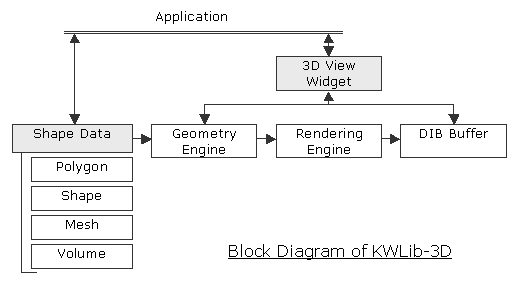
  <description>&lt;div class=&#39;DOC_H2&#39;&gt; Objective&lt;/div&gt;I have developed this 3D-graphics library &quot;KWLib-3D&quot; by myself to study various 3D-graphics algorithms.&lt;br /&gt;
Features are as follows:&lt;br /&gt;
&lt;br /&gt;
&lt;ol class=&#39;DOC_OL&#39; &gt;&lt;li&gt;
 All functions are implemented by myself.&lt;br /&gt;
 I&#39;m not using any 3D library, such as DirectX-3D or Open-GL.&lt;br /&gt;
&lt;li&gt;
 Uses Z-Buffering as hidden surface removal method.&lt;br /&gt;
&lt;li&gt;
 Based on the KWLib class library.&lt;br /&gt;
&lt;/ol&gt;
&lt;br /&gt;
Functions of KWLib-3D: (as of Apr 10, 2002)&lt;br /&gt;
&lt;ul class=&#39;DOC_UL&#39; &gt;&lt;li&gt;
 Shapes: Point, Line, Triangle, Rectangle, Box, Sphere, Cylinder, Prism, Ring, Circle&lt;br /&gt;
&lt;li&gt;
 Various types of Mesh: Mesh, Mesh with color&lt;br /&gt;
&lt;li&gt;
 Regular polygon generator.&lt;br /&gt;
&lt;li&gt;
 Rendering: Z-Buffer, Flat/Phong shading&lt;br /&gt;
&lt;li&gt;
 Only view point can change the location.&lt;br /&gt;
&lt;li&gt;
 Translucent. (using Z-Buffer and Z-Sort.)&lt;br /&gt;
&lt;li&gt;
 Texture mapping to sphere/plane.&lt;br /&gt;
&lt;li&gt;
 Stereo view mode.&lt;br /&gt;
&lt;li&gt;
 Volume Rendering.&lt;br /&gt;
&lt;li&gt;
 3D Turtle Graphics.&lt;br /&gt;
&lt;li&gt;
 140,000 polygons per second. (At Celeron 550MHz)&lt;br /&gt;
&lt;/ul&gt;
&lt;div class=&quot;DOC_IMGBOX&quot;&gt;&lt;img  class=&quot;DOC_IMGBOX&quot;  src=&quot;http://www.iktsoft.net/ws/f/162/437.png&quot; alt=&quot;&quot;  /&gt;&lt;/div&gt;&lt;div style=&#39;clear:both;&#39;&gt;&lt;/div&gt;&lt;br /&gt;
&lt;br /&gt;
&lt;div class=&#39;DOC_H2&#39;&gt; Samples&lt;/div&gt;&lt;div class=&#39;DOC_DIV&#39; style=&#39;float:left;&#39;&gt;&lt;br /&gt;
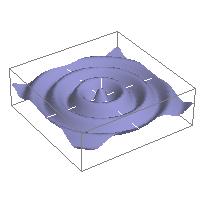
&lt;div class=&quot;DOC_IMGBOX&quot;&gt;&lt;img  class=&quot;DOC_IMGBOX&quot;  src=&quot;http://www.iktsoft.net/ws/f/162/438.jpg&quot; alt=&quot;&quot;  /&gt;&lt;/div&gt;&lt;div style=&#39;clear:both;&#39;&gt;&lt;/div&gt;&lt;br /&gt;
&lt;/div&gt;Mesh&lt;br /&gt;
Function: r=sqrt(x*x+y*y)*6, z=(exp(-0.05*r)*cos(sqrt(1-0.01)*r+0))*0.5&lt;br /&gt;
Z-Buffering, Phone shading&lt;br /&gt;
&lt;div style=&#39;clear:both;&#39; &gt;&lt;/div&gt;&lt;br /&gt;
&lt;div class=&#39;DOC_DIV&#39; style=&#39;float:left;&#39;&gt;&lt;br /&gt;
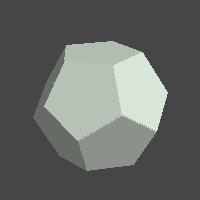
&lt;div class=&quot;DOC_IMGBOX&quot;&gt;&lt;img  class=&quot;DOC_IMGBOX&quot;  src=&quot;http://www.iktsoft.net/ws/f/162/439.jpg&quot; alt=&quot;&quot;  /&gt;&lt;/div&gt;&lt;div style=&#39;clear:both;&#39;&gt;&lt;/div&gt;&lt;br /&gt;
&lt;/div&gt;Polygon sample (regular icosahedron)&lt;br /&gt;
Z-Buffering&lt;br /&gt;
&lt;div style=&#39;clear:both;&#39; &gt;&lt;/div&gt;&lt;br /&gt;
&lt;div class=&#39;DOC_DIV&#39; style=&#39;float:left;&#39;&gt;&lt;br /&gt;
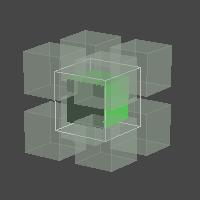
&lt;div class=&quot;DOC_IMGBOX&quot;&gt;&lt;img  class=&quot;DOC_IMGBOX&quot;  src=&quot;http://www.iktsoft.net/ws/f/162/440.jpg&quot; alt=&quot;&quot;  /&gt;&lt;/div&gt;&lt;div style=&#39;clear:both;&#39;&gt;&lt;/div&gt;&lt;br /&gt;
&lt;/div&gt;Polygon sample (Translucent Boxes)&lt;br /&gt;
Z-Buffering/Z-Sorting for translucent objects&lt;br /&gt;
&lt;div style=&#39;clear:both;&#39; &gt;&lt;/div&gt;&lt;br /&gt;
&lt;div class=&#39;DOC_DIV&#39; style=&#39;float:left;&#39;&gt;&lt;br /&gt;
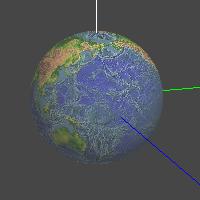
&lt;div class=&quot;DOC_IMGBOX&quot;&gt;&lt;img  class=&quot;DOC_IMGBOX&quot;  src=&quot;http://www.iktsoft.net/ws/f/162/441.jpg&quot; alt=&quot;&quot;  /&gt;&lt;/div&gt;&lt;div style=&#39;clear:both;&#39;&gt;&lt;/div&gt;&lt;br /&gt;
&lt;/div&gt;Texture Mapping to Sphere&lt;br /&gt;
&lt;div style=&#39;clear:both;&#39; &gt;&lt;/div&gt;&lt;br /&gt;
&lt;div class=&#39;DOC_DIV&#39; style=&#39;float:left;&#39;&gt;&lt;br /&gt;
&lt;div class=&quot;DOC_IMGBOX&quot;&gt;&lt;img  class=&quot;DOC_IMGBOX&quot;  src=&quot;http://www.iktsoft.net/ws/f/162/442.jpg&quot; alt=&quot;&quot;  /&gt;&lt;/div&gt;&lt;div style=&#39;clear:both;&#39;&gt;&lt;/div&gt;&lt;br /&gt;
&lt;/div&gt;Volume Rendering&lt;br /&gt;
&lt;div style=&#39;clear:both;&#39; &gt;&lt;/div&gt;&lt;br /&gt;
&lt;div class=&#39;DOC_DIV&#39; style=&#39;float:left;&#39;&gt;&lt;br /&gt;
&lt;div class=&quot;DOC_IMGBOX&quot;&gt;&lt;img  class=&quot;DOC_IMGBOX&quot;  src=&quot;http://www.iktsoft.net/ws/f/162/443.jpg&quot; alt=&quot;&quot;  /&gt;&lt;/div&gt;&lt;div style=&#39;clear:both;&#39;&gt;&lt;/div&gt;&lt;br /&gt;
&lt;/div&gt;Turtle Graphics&lt;br /&gt;
&lt;div style=&#39;clear:both;&#39; &gt;&lt;/div&gt;&lt;br /&gt;
</description>
<content:encoded><![CDATA[<div class='DOC_H2'> Objective</div>I have developed this 3D-graphics library "KWLib-3D" by myself to study various 3D-graphics algorithms.<br />
Features are as follows:<br />
<br />
<ol class='DOC_OL' ><li>
 All functions are implemented by myself.<br />
 I'm not using any 3D library, such as DirectX-3D or Open-GL.<br />
<li>
 Uses Z-Buffering as hidden surface removal method.<br />
<li>
 Based on the KWLib class library.<br />
</ol>
<br />
Functions of KWLib-3D: (as of Apr 10, 2002)<br />
<ul class='DOC_UL' ><li>
 Shapes: Point, Line, Triangle, Rectangle, Box, Sphere, Cylinder, Prism, Ring, Circle<br />
<li>
 Various types of Mesh: Mesh, Mesh with color<br />
<li>
 Regular polygon generator.<br />
<li>
 Rendering: Z-Buffer, Flat/Phong shading<br />
<li>
 Only view point can change the location.<br />
<li>
 Translucent. (using Z-Buffer and Z-Sort.)<br />
<li>
 Texture mapping to sphere/plane.<br />
<li>
 Stereo view mode.<br />
<li>
 Volume Rendering.<br />
<li>
 3D Turtle Graphics.<br />
<li>
 140,000 polygons per second. (At Celeron 550MHz)<br />
</ul>
<div class="DOC_IMGBOX"><img  class="DOC_IMGBOX"  src="http://www.iktsoft.net/ws/f/162/437.png" alt=""  /></div><div style='clear:both;'></div><br />
<br />
<div class='DOC_H2'> Samples</div><div class='DOC_DIV' style='float:left;'><br />
<div class="DOC_IMGBOX"><img  class="DOC_IMGBOX"  src="http://www.iktsoft.net/ws/f/162/438.jpg" alt=""  /></div><div style='clear:both;'></div><br />
</div>Mesh<br />
Function: r=sqrt(x*x+y*y)*6, z=(exp(-0.05*r)*cos(sqrt(1-0.01)*r+0))*0.5<br />
Z-Buffering, Phone shading<br />
<div style='clear:both;' ></div><br />
<div class='DOC_DIV' style='float:left;'><br />
<div class="DOC_IMGBOX"><img  class="DOC_IMGBOX"  src="http://www.iktsoft.net/ws/f/162/439.jpg" alt=""  /></div><div style='clear:both;'></div><br />
</div>Polygon sample (regular icosahedron)<br />
Z-Buffering<br />
<div style='clear:both;' ></div><br />
<div class='DOC_DIV' style='float:left;'><br />
<div class="DOC_IMGBOX"><img  class="DOC_IMGBOX"  src="http://www.iktsoft.net/ws/f/162/440.jpg" alt=""  /></div><div style='clear:both;'></div><br />
</div>Polygon sample (Translucent Boxes)<br />
Z-Buffering/Z-Sorting for translucent objects<br />
<div style='clear:both;' ></div><br />
<div class='DOC_DIV' style='float:left;'><br />
<div class="DOC_IMGBOX"><img  class="DOC_IMGBOX"  src="http://www.iktsoft.net/ws/f/162/441.jpg" alt=""  /></div><div style='clear:both;'></div><br />
</div>Texture Mapping to Sphere<br />
<div style='clear:both;' ></div><br />
<div class='DOC_DIV' style='float:left;'><br />
<div class="DOC_IMGBOX"><img  class="DOC_IMGBOX"  src="http://www.iktsoft.net/ws/f/162/442.jpg" alt=""  /></div><div style='clear:both;'></div><br />
</div>Volume Rendering<br />
<div style='clear:both;' ></div><br />
<div class='DOC_DIV' style='float:left;'><br />
<div class="DOC_IMGBOX"><img  class="DOC_IMGBOX"  src="http://www.iktsoft.net/ws/f/162/443.jpg" alt=""  /></div><div style='clear:both;'></div><br />
</div>Turtle Graphics<br />
<div style='clear:both;' ></div><br />
]]></content:encoded>
 	<dc:creator>keiji</dc:creator>
	<dc:date>2002-04-10T08:19:00-07:00</dc:date>
</item>
<item rdf:about="http://www.iktsoft.net/keiji-en/articles/5806">
  <title>Electron orbitals of Hydrogen-like atom</title>
  <link>http://www.iktsoft.net/keiji-en/articles/5806</link>
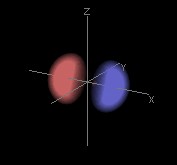
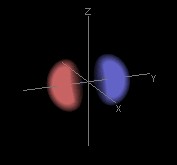
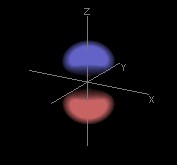
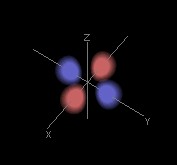
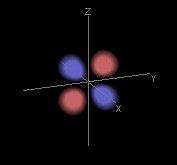
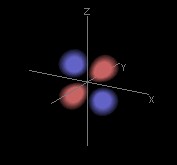
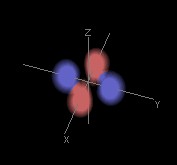
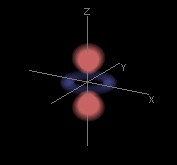
  <description>&lt;div class=&#39;DOC_H2&#39;&gt; Objective&lt;/div&gt;These are results of volume rendering of electron orbitals of Hydrogen-like atom.&lt;br /&gt;
All in 50 x 50 x 50 uniform mesh resolution.&lt;br /&gt;
Plot only P(&lt;em&gt;r&lt;/em&gt;)&amp;gt;0.15.&lt;br /&gt;
&lt;br /&gt;
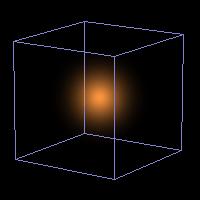
&lt;div class=&#39;DOC_H3&#39;&gt; n=1&lt;/div&gt;&lt;img  class=&quot;DOC_IMG&quot;  src=&quot;http://www.iktsoft.net/ws/f/162/674.jpg&quot; alt=&quot;&quot;  /&gt;&lt;br /&gt;
&lt;br /&gt;
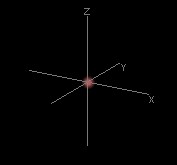
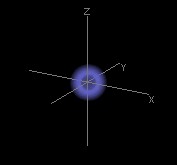
&lt;div class=&#39;DOC_H3&#39;&gt; n=2&lt;/div&gt;&lt;img  class=&quot;DOC_IMG&quot;  src=&quot;http://www.iktsoft.net/ws/f/162/675.jpg&quot; alt=&quot;&quot;  /&gt;&lt;br /&gt;
&lt;img  class=&quot;DOC_IMG&quot;  src=&quot;http://www.iktsoft.net/ws/f/162/676.jpg&quot; alt=&quot;&quot;  /&gt; &lt;img  class=&quot;DOC_IMG&quot;  src=&quot;http://www.iktsoft.net/ws/f/162/677.jpg&quot; alt=&quot;&quot;  /&gt; &lt;img  class=&quot;DOC_IMG&quot;  src=&quot;http://www.iktsoft.net/ws/f/162/678.jpg&quot; alt=&quot;&quot;  /&gt;&lt;br /&gt;
&lt;br /&gt;
&lt;div class=&#39;DOC_H3&#39;&gt; n=3&lt;/div&gt;&lt;img  class=&quot;DOC_IMG&quot;  src=&quot;http://www.iktsoft.net/ws/f/162/679.jpg&quot; alt=&quot;&quot;  /&gt;&lt;br /&gt;
&lt;img  class=&quot;DOC_IMG&quot;  src=&quot;http://www.iktsoft.net/ws/f/162/680.jpg&quot; alt=&quot;&quot;  /&gt; &lt;img  class=&quot;DOC_IMG&quot;  src=&quot;http://www.iktsoft.net/ws/f/162/681.jpg&quot; alt=&quot;&quot;  /&gt; &lt;img  class=&quot;DOC_IMG&quot;  src=&quot;http://www.iktsoft.net/ws/f/162/682.jpg&quot; alt=&quot;&quot;  /&gt;&lt;br /&gt;
&lt;img  class=&quot;DOC_IMG&quot;  src=&quot;http://www.iktsoft.net/ws/f/162/683.jpg&quot; alt=&quot;&quot;  /&gt; &lt;img  class=&quot;DOC_IMG&quot;  src=&quot;http://www.iktsoft.net/ws/f/162/684.jpg&quot; alt=&quot;&quot;  /&gt; &lt;img  class=&quot;DOC_IMG&quot;  src=&quot;http://www.iktsoft.net/ws/f/162/685.jpg&quot; alt=&quot;&quot;  /&gt; &lt;img  class=&quot;DOC_IMG&quot;  src=&quot;http://www.iktsoft.net/ws/f/162/686.jpg&quot; alt=&quot;&quot;  /&gt;&lt;br /&gt;
&lt;img  class=&quot;DOC_IMG&quot;  src=&quot;http://www.iktsoft.net/ws/f/162/687.jpg&quot; alt=&quot;&quot;  /&gt;&lt;br /&gt;
&lt;br /&gt;
&lt;div class=&#39;DOC_H2&#39;&gt; Related Links&lt;/div&gt;&lt;ul class=&#39;DOC_UL&#39; &gt;&lt;li&gt;
 The Net Equation: &lt;a class=&#39;DOC_LINK&#39; target=&#39;_blank&#39; href=&quot;//library.thinkquest.org/C004970/atoms/orbital.htm&quot; title=&quot;Electron Orbitals, Quantum Numbers, and Orbital Filling&quot;&gt;Electron Orbitals, Quantum Numbers, and Orbital Filling&lt;/a&gt;&lt;br /&gt;
&lt;li&gt;
 Orbital Viewer Software: &lt;a class=&#39;DOC_LINK&#39; target=&#39;_blank&#39; href=&quot;//www.orbitals.com/orb/&quot; title=&quot;Atomic Orbitals&quot;&gt;Atomic Orbitals&lt;/a&gt;&lt;br /&gt;
 From the site, you can download really nice software and document which includes a complete explanation and equations.&lt;br /&gt;
&lt;li&gt;
 Wikipedia: &lt;a class=&#39;DOC_LINK&#39; target=&#39;_blank&#39; href=&quot;//en.wikipedia.org/wiki/Electron_orbital&quot; title=&quot;Electron orbital&quot;&gt;Electron orbital&lt;/a&gt;&lt;br /&gt;
&lt;/ul&gt;
&lt;br /&gt;
&lt;br /&gt;
&lt;div class=&#39;DOC_H2&#39;&gt; References&lt;/div&gt;Morrison, Michael. Estle, Thomas L., Lane, Neal F., &lt;em&gt;Quantum States of Atoms, Molecules, and Solids. &lt;/em&gt; Prentice-Hall, INC., 1976, ISBN:0137479808&lt;br /&gt;
House, J.E., &lt;em&gt;Fundamentals of Quantum Mechanics&lt;/em&gt;, Academic Press, 1998, ISBN:0123567750&lt;br /&gt;
&lt;br /&gt;
&lt;div class=&#39;DOC_AMAZON_BOX&#39;&gt;&lt;iframe src=&quot;https://rcm.amazon.com/e/cm?t=taktranet-20&amp;o=1&amp;p=8&amp;l=as1&amp;asins=0137479808&amp;fc1=000000&amp;IS2=1&amp;lt1=_blank&amp;lc1=0000FF&amp;bc1=AAAAAA&amp;bg1=FFFFFF&amp;m=amazon&amp;f=ifr&quot; style=&quot;width:120px;height:240px;&quot; scrolling=&quot;no&quot; marginwidth=&quot;0&quot; marginheight=&quot;0&quot; frameborder=&quot;0&quot;&gt;&lt;/iframe&gt;&lt;/div&gt;&lt;div class=&#39;DOC_AMAZON_BOX&#39;&gt;&lt;iframe src=&quot;https://rcm.amazon.com/e/cm?t=taktranet-20&amp;o=1&amp;p=8&amp;l=as1&amp;asins=0123567750&amp;fc1=000000&amp;IS2=1&amp;lt1=_blank&amp;lc1=0000FF&amp;bc1=AAAAAA&amp;bg1=FFFFFF&amp;m=amazon&amp;f=ifr&quot; style=&quot;width:120px;height:240px;&quot; scrolling=&quot;no&quot; marginwidth=&quot;0&quot; marginheight=&quot;0&quot; frameborder=&quot;0&quot;&gt;&lt;/iframe&gt;&lt;/div&gt;&lt;br /&gt;
</description>
<content:encoded><![CDATA[<div class='DOC_H2'> Objective</div>These are results of volume rendering of electron orbitals of Hydrogen-like atom.<br />
All in 50 x 50 x 50 uniform mesh resolution.<br />
Plot only P(<em>r</em>)&gt;0.15.<br />
<br />
<div class='DOC_H3'> n=1</div><img  class="DOC_IMG"  src="http://www.iktsoft.net/ws/f/162/674.jpg" alt=""  /><br />
<br />
<div class='DOC_H3'> n=2</div><img  class="DOC_IMG"  src="http://www.iktsoft.net/ws/f/162/675.jpg" alt=""  /><br />
<img  class="DOC_IMG"  src="http://www.iktsoft.net/ws/f/162/676.jpg" alt=""  /> <img  class="DOC_IMG"  src="http://www.iktsoft.net/ws/f/162/677.jpg" alt=""  /> <img  class="DOC_IMG"  src="http://www.iktsoft.net/ws/f/162/678.jpg" alt=""  /><br />
<br />
<div class='DOC_H3'> n=3</div><img  class="DOC_IMG"  src="http://www.iktsoft.net/ws/f/162/679.jpg" alt=""  /><br />
<img  class="DOC_IMG"  src="http://www.iktsoft.net/ws/f/162/680.jpg" alt=""  /> <img  class="DOC_IMG"  src="http://www.iktsoft.net/ws/f/162/681.jpg" alt=""  /> <img  class="DOC_IMG"  src="http://www.iktsoft.net/ws/f/162/682.jpg" alt=""  /><br />
<img  class="DOC_IMG"  src="http://www.iktsoft.net/ws/f/162/683.jpg" alt=""  /> <img  class="DOC_IMG"  src="http://www.iktsoft.net/ws/f/162/684.jpg" alt=""  /> <img  class="DOC_IMG"  src="http://www.iktsoft.net/ws/f/162/685.jpg" alt=""  /> <img  class="DOC_IMG"  src="http://www.iktsoft.net/ws/f/162/686.jpg" alt=""  /><br />
<img  class="DOC_IMG"  src="http://www.iktsoft.net/ws/f/162/687.jpg" alt=""  /><br />
<br />
<div class='DOC_H2'> Related Links</div><ul class='DOC_UL' ><li>
 The Net Equation: <a class='DOC_LINK' target='_blank' href="//library.thinkquest.org/C004970/atoms/orbital.htm" title="Electron Orbitals, Quantum Numbers, and Orbital Filling">Electron Orbitals, Quantum Numbers, and Orbital Filling</a><br />
<li>
 Orbital Viewer Software: <a class='DOC_LINK' target='_blank' href="//www.orbitals.com/orb/" title="Atomic Orbitals">Atomic Orbitals</a><br />
 From the site, you can download really nice software and document which includes a complete explanation and equations.<br />
<li>
 Wikipedia: <a class='DOC_LINK' target='_blank' href="//en.wikipedia.org/wiki/Electron_orbital" title="Electron orbital">Electron orbital</a><br />
</ul>
<br />
<br />
<div class='DOC_H2'> References</div>Morrison, Michael. Estle, Thomas L., Lane, Neal F., <em>Quantum States of Atoms, Molecules, and Solids. </em> Prentice-Hall, INC., 1976, ISBN:0137479808<br />
House, J.E., <em>Fundamentals of Quantum Mechanics</em>, Academic Press, 1998, ISBN:0123567750<br />
<br />
<div class='DOC_AMAZON_BOX'><iframe src="https://rcm.amazon.com/e/cm?t=taktranet-20&o=1&p=8&l=as1&asins=0137479808&fc1=000000&IS2=1&lt1=_blank&lc1=0000FF&bc1=AAAAAA&bg1=FFFFFF&m=amazon&f=ifr" style="width:120px;height:240px;" scrolling="no" marginwidth="0" marginheight="0" frameborder="0"></iframe></div><div class='DOC_AMAZON_BOX'><iframe src="https://rcm.amazon.com/e/cm?t=taktranet-20&o=1&p=8&l=as1&asins=0123567750&fc1=000000&IS2=1&lt1=_blank&lc1=0000FF&bc1=AAAAAA&bg1=FFFFFF&m=amazon&f=ifr" style="width:120px;height:240px;" scrolling="no" marginwidth="0" marginheight="0" frameborder="0"></iframe></div><br />
]]></content:encoded>
 	<dc:creator>keiji</dc:creator>
	<dc:date>2002-02-22T10:43:00-08:00</dc:date>
</item>
<item rdf:about="http://www.iktsoft.net/keiji-en/articles/5295">
  <title>KWLib: Windows Class Library</title>
  <link>http://www.iktsoft.net/keiji-en/articles/5295</link>
  <description>&lt;div class=&#39;DOC_H2&#39;&gt; Objective&lt;/div&gt;When I was interested in windows programming in 1993, I used OWL1.0(Object Windows Library from Borland). After short time I used the library, I got interested in how these library is implemented. I studied how to implement event-driven mechanism into C++ class library. At the same time I felt there are many inconvenience in C++. So I designed some classes such as string, file I/O, container, process/thread, etc. The &quot;KWLib&quot; is a summarization of my classes.&lt;br /&gt;
I have been developing this library for many years in my spare time. All of my software are developed using this library.&lt;br /&gt;
&lt;br /&gt;
The reasons why I developed this class library from scratch are as follow:&lt;br /&gt;
&lt;br /&gt;
&lt;ul class=&#39;DOC_UL&#39; &gt;&lt;li&gt;
 To study mechanism of framework class library.&lt;br /&gt;
&lt;li&gt;
 To experiment various implementation method.&lt;br /&gt;
&lt;li&gt;
 To experiment various user interfaces.&lt;br /&gt;
&lt;li&gt;
 To study various algorithms.&lt;br /&gt;
&lt;/ul&gt;
&lt;br /&gt;
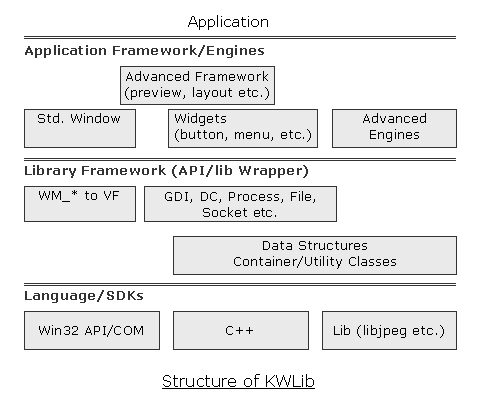
&lt;div class=&#39;DOC_H2&#39;&gt; Structure&lt;/div&gt;&lt;div class=&quot;DOC_IMGBOX&quot;&gt;&lt;img  class=&quot;DOC_IMGBOX&quot;  src=&quot;http://www.iktsoft.net/ws/f/162/661.png&quot; alt=&quot;&quot;  /&gt;&lt;/div&gt;&lt;div style=&#39;clear:both;&#39;&gt;&lt;/div&gt;&lt;br /&gt;
&lt;br /&gt;
&lt;div class=&#39;DOC_H2&#39;&gt; Components&lt;/div&gt;The latest version is kwlib3f-Feb09-2002, which has about 200KLOC (200000 lines of code).&lt;br /&gt;
The KWLib is consists of such components as follows:&lt;br /&gt;
&lt;br /&gt;
&lt;ul class=&#39;DOC_UL&#39; &gt;&lt;li&gt;
 Classes to extend C++&lt;br /&gt;
&lt;ul class=&#39;DOC_UL&#39; &gt;&lt;li&gt;
 KStr: String Class&lt;br /&gt;
&lt;li&gt;
 Container Classes&lt;br /&gt;
&lt;li&gt;
 FunctionClasses&lt;br /&gt;
&lt;/ul&gt;&lt;li&gt;
 Numerical Computation&lt;br /&gt;
&lt;ul class=&#39;DOC_UL&#39; &gt;&lt;li&gt;
 Multiple-Precision Arithmetic.&lt;br /&gt;
&lt;/ul&gt;&lt;li&gt;
 Process and Thread control&lt;br /&gt;
&lt;ul class=&#39;DOC_UL&#39; &gt;&lt;li&gt;
 KProcess, KThread, KMutex&lt;br /&gt;
&lt;/ul&gt;&lt;li&gt;
 Scripting Engine (KWLib-sh)&lt;br /&gt;
&lt;li&gt;
 Classes to develop windows application&lt;br /&gt;
&lt;ul class=&#39;DOC_UL&#39; &gt;&lt;li&gt;
 Windows Class&lt;br /&gt;
&lt;li&gt;
 Window&#39;s objects (GDI,DIB,etc.)&lt;br /&gt;
&lt;li&gt;
 GUI Objects&lt;br /&gt;
&lt;li&gt;
 KWLib-GUI Widgets (Button, Menu, Scrollbar, etc.)&lt;br /&gt;
 These controls are not wrapper class of existing window&#39;s class, but my original controls created from scratch. The reason why I developed them from scratch is to experiment various user interface requirement, which is beyond just modification of existing controls.&lt;br /&gt;
&lt;li&gt;
 Print/Preview Component&lt;br /&gt;
&lt;/ul&gt;&lt;li&gt;
 UI Description Language&lt;br /&gt;
&lt;ul class=&#39;DOC_UL&#39; &gt;&lt;li&gt;
 Menu/Toolbar definition&lt;br /&gt;
&lt;li&gt;
 Dialog definition&lt;br /&gt;
&lt;/ul&gt;&lt;li&gt;
 Classes expanding the ability of KWLib&lt;br /&gt;
&lt;ul class=&#39;DOC_UL&#39; &gt;&lt;li&gt;
 Image manipulation Class&lt;br /&gt;
&lt;li&gt;
 3D-Graphics Engine (KWLib-3D)&lt;br /&gt;
&lt;/ul&gt;&lt;/ul&gt;</description>
<content:encoded><![CDATA[<div class='DOC_H2'> Objective</div>When I was interested in windows programming in 1993, I used OWL1.0(Object Windows Library from Borland). After short time I used the library, I got interested in how these library is implemented. I studied how to implement event-driven mechanism into C++ class library. At the same time I felt there are many inconvenience in C++. So I designed some classes such as string, file I/O, container, process/thread, etc. The "KWLib" is a summarization of my classes.<br />
I have been developing this library for many years in my spare time. All of my software are developed using this library.<br />
<br />
The reasons why I developed this class library from scratch are as follow:<br />
<br />
<ul class='DOC_UL' ><li>
 To study mechanism of framework class library.<br />
<li>
 To experiment various implementation method.<br />
<li>
 To experiment various user interfaces.<br />
<li>
 To study various algorithms.<br />
</ul>
<br />
<div class='DOC_H2'> Structure</div><div class="DOC_IMGBOX"><img  class="DOC_IMGBOX"  src="http://www.iktsoft.net/ws/f/162/661.png" alt=""  /></div><div style='clear:both;'></div><br />
<br />
<div class='DOC_H2'> Components</div>The latest version is kwlib3f-Feb09-2002, which has about 200KLOC (200000 lines of code).<br />
The KWLib is consists of such components as follows:<br />
<br />
<ul class='DOC_UL' ><li>
 Classes to extend C++<br />
<ul class='DOC_UL' ><li>
 KStr: String Class<br />
<li>
 Container Classes<br />
<li>
 FunctionClasses<br />
</ul><li>
 Numerical Computation<br />
<ul class='DOC_UL' ><li>
 Multiple-Precision Arithmetic.<br />
</ul><li>
 Process and Thread control<br />
<ul class='DOC_UL' ><li>
 KProcess, KThread, KMutex<br />
</ul><li>
 Scripting Engine (KWLib-sh)<br />
<li>
 Classes to develop windows application<br />
<ul class='DOC_UL' ><li>
 Windows Class<br />
<li>
 Window's objects (GDI,DIB,etc.)<br />
<li>
 GUI Objects<br />
<li>
 KWLib-GUI Widgets (Button, Menu, Scrollbar, etc.)<br />
 These controls are not wrapper class of existing window's class, but my original controls created from scratch. The reason why I developed them from scratch is to experiment various user interface requirement, which is beyond just modification of existing controls.<br />
<li>
 Print/Preview Component<br />
</ul><li>
 UI Description Language<br />
<ul class='DOC_UL' ><li>
 Menu/Toolbar definition<br />
<li>
 Dialog definition<br />
</ul><li>
 Classes expanding the ability of KWLib<br />
<ul class='DOC_UL' ><li>
 Image manipulation Class<br />
<li>
 3D-Graphics Engine (KWLib-3D)<br />
</ul></ul>]]></content:encoded>
 	<dc:creator>keiji</dc:creator>
	<dc:date>2002-02-09T02:01:00-08:00</dc:date>
</item>
<item rdf:about="http://www.iktsoft.net/keiji-en/articles/4693">
  <title>Fractal Tree Generator</title>
  <link>http://www.iktsoft.net/keiji-en/articles/4693</link>
  <description>&lt;div class=&#39;DOC_H2&#39;&gt; Overview&lt;/div&gt;Using a turtle graphic and recursive functions is relatively an easy way to generate trees or plants in a computer.&lt;br /&gt;
&lt;br /&gt;
&lt;div class=&#39;DOC_H2&#39;&gt; Simple Version&lt;/div&gt;This is very simple algorithm like this:&lt;br /&gt;
&lt;div class=&quot;DOC_IMGBOX&quot;&gt;&lt;img  class=&quot;DOC_IMGBOX&quot;  src=&quot;http://www.iktsoft.net/ws/f/162/451.png&quot; alt=&quot;&quot;  /&gt;&lt;/div&gt;&lt;div style=&#39;clear:both;&#39;&gt;&lt;/div&gt;&lt;br /&gt;
&lt;pre class=&#39;DOC_PRE&#39;&gt;
void KwTree_001(K3DTurtle kt,float w,int ct)
{
  if(ct&amp;lt;0) return;
  float w1=w/4.0, w2=w1*3.;
  kt.Move(w1);    // Draw line only 1/4 length.
  K3DTurtle kt2;
  int i,n=4;
  float a=30, b=360/n;
  for(i=0;i&amp;lt;n;i++){
    kt2=kt; kt2.TurnUp(a);
    // Recursive Call. Change the length slightly by random.
    KwTree_001(kt2,w2*(1.0+0.05*(rand()%10-5)),ct-1);
    kt.RotateRight(b*(i+1));
  }
}

KwTree_001(k3t,w,4);  // Main Call
&lt;/pre&gt;
&lt;br /&gt;
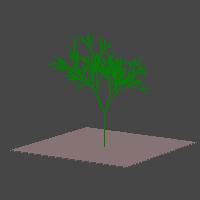
&lt;div class=&#39;DOC_H2&#39;&gt; A little improved version&lt;/div&gt;&lt;div class=&quot;DOC_IMGBOX&quot;&gt;&lt;img  class=&quot;DOC_IMGBOX&quot;  src=&quot;http://www.iktsoft.net/ws/f/162/452.png&quot; alt=&quot;&quot;  /&gt;&lt;/div&gt;&lt;div style=&#39;clear:both;&#39;&gt;&lt;/div&gt;&lt;br /&gt;
Used iteration to grow trunk, and used recursion to generate branch.&lt;br /&gt;
&lt;br /&gt;
&lt;div class=&#39;DOC_H2&#39;&gt; More Sophisticated Version&lt;/div&gt;I&#39;m planning to use two important characteristics:&lt;br /&gt;
&lt;ul class=&#39;DOC_UL&#39; &gt;&lt;li&gt;
 Both Recursive Call and Iteration to simulate growing.&lt;br /&gt;
&lt;li&gt;
 Genetic information and its realization mechanisms to simulate a generation of body.&lt;br /&gt;
&lt;/ul&gt;</description>
<content:encoded><![CDATA[<div class='DOC_H2'> Overview</div>Using a turtle graphic and recursive functions is relatively an easy way to generate trees or plants in a computer.<br />
<br />
<div class='DOC_H2'> Simple Version</div>This is very simple algorithm like this:<br />
<div class="DOC_IMGBOX"><img  class="DOC_IMGBOX"  src="http://www.iktsoft.net/ws/f/162/451.png" alt=""  /></div><div style='clear:both;'></div><br />
<pre class='DOC_PRE'>
void KwTree_001(K3DTurtle kt,float w,int ct)
{
  if(ct&lt;0) return;
  float w1=w/4.0, w2=w1*3.;
  kt.Move(w1);    // Draw line only 1/4 length.
  K3DTurtle kt2;
  int i,n=4;
  float a=30, b=360/n;
  for(i=0;i&lt;n;i++){
    kt2=kt; kt2.TurnUp(a);
    // Recursive Call. Change the length slightly by random.
    KwTree_001(kt2,w2*(1.0+0.05*(rand()%10-5)),ct-1);
    kt.RotateRight(b*(i+1));
  }
}

KwTree_001(k3t,w,4);  // Main Call
</pre>
<br />
<div class='DOC_H2'> A little improved version</div><div class="DOC_IMGBOX"><img  class="DOC_IMGBOX"  src="http://www.iktsoft.net/ws/f/162/452.png" alt=""  /></div><div style='clear:both;'></div><br />
Used iteration to grow trunk, and used recursion to generate branch.<br />
<br />
<div class='DOC_H2'> More Sophisticated Version</div>I'm planning to use two important characteristics:<br />
<ul class='DOC_UL' ><li>
 Both Recursive Call and Iteration to simulate growing.<br />
<li>
 Genetic information and its realization mechanisms to simulate a generation of body.<br />
</ul>]]></content:encoded>
 	<dc:creator>keiji</dc:creator>
	<dc:date>2001-07-05T07:45:00-07:00</dc:date>
</item>
<item rdf:about="http://www.iktsoft.net/keiji-en/articles/6023">
  <title>Astronomy with Computer</title>
  <link>http://www.iktsoft.net/keiji-en/articles/6023</link>
  <description>&lt;div class=&#39;DOC_H2&#39;&gt; Objective&lt;/div&gt;When I was in senior high school, I was vert interested in Astronomy, especially calculating and visualizing the Planets. I devoted in programming of the location of the Nine Planets. In those day I used PC-9801F2(NEC) and N88-DISK BASIC(86). Now is the time to remake those programs into Windows application.&lt;br /&gt;
I am planning to make programs such as follows:&lt;br /&gt;
&lt;br /&gt;
&lt;ul class=&#39;DOC_UL&#39; &gt;&lt;li&gt;
 Calculate the nine planets&#39; location and show how they are seen from space.&lt;br /&gt;
&lt;li&gt;
 Planisphere&lt;br /&gt;
&lt;/ul&gt;
&lt;br /&gt;
&lt;div class=&#39;DOC_H2&#39;&gt; Sample Outputs&lt;/div&gt;These are sample outputs. This program is a 3D-MapViewer with KWlib-3D.&lt;br /&gt;
&lt;br /&gt;
&lt;div class=&#39;DOC_H3&#39;&gt; Planetary Images&lt;/div&gt;&lt;table  class=&#39;DOC_TABLE&#39;  style=&#39;&#39;&gt;
&lt;tr &gt;&lt;td &gt;The Earth&lt;/td&gt;&lt;td &gt;The Moon &lt;/td&gt;&lt;/tr&gt;&lt;tr &gt;&lt;td &gt;&lt;div class=&quot;DOC_IMGBOX&quot;&gt;&lt;img  class=&quot;DOC_IMGBOX&quot;  src=&quot;http://www.iktsoft.net/ws/f/162/717.jpg&quot; alt=&quot;&quot;  /&gt;&lt;/div&gt;&lt;div style=&#39;clear:both;&#39;&gt;&lt;/div&gt;&lt;/td&gt;&lt;td &gt;&lt;div class=&quot;DOC_IMGBOX&quot;&gt;&lt;img  class=&quot;DOC_IMGBOX&quot;  src=&quot;http://www.iktsoft.net/ws/f/162/720.jpg&quot; alt=&quot;&quot;  /&gt;&lt;/div&gt;&lt;div style=&#39;clear:both;&#39;&gt;&lt;/div&gt;&lt;/td&gt;&lt;/tr&gt;&lt;tr &gt;&lt;td &gt;The Venus&lt;/td&gt;&lt;td &gt;&lt;/td&gt;&lt;/tr&gt;&lt;tr &gt;&lt;td &gt;&lt;div class=&quot;DOC_IMGBOX&quot;&gt;&lt;img  class=&quot;DOC_IMGBOX&quot;  src=&quot;http://www.iktsoft.net/ws/f/162/721.jpg&quot; alt=&quot;&quot;  /&gt;&lt;/div&gt;&lt;div style=&#39;clear:both;&#39;&gt;&lt;/div&gt;&lt;/td&gt;&lt;td &gt;&lt;/td&gt;&lt;/tr&gt;&lt;tr &gt;&lt;td &gt;The Mars&lt;/td&gt;&lt;td &gt;The Jupiter &lt;/td&gt;&lt;/tr&gt;&lt;tr &gt;&lt;td &gt;&lt;div class=&quot;DOC_IMGBOX&quot;&gt;&lt;img  class=&quot;DOC_IMGBOX&quot;  src=&quot;http://www.iktsoft.net/ws/f/162/719.jpg&quot; alt=&quot;&quot;  /&gt;&lt;/div&gt;&lt;div style=&#39;clear:both;&#39;&gt;&lt;/div&gt;&lt;/td&gt;&lt;td &gt;&lt;div class=&quot;DOC_IMGBOX&quot;&gt;&lt;img  class=&quot;DOC_IMGBOX&quot;  src=&quot;http://www.iktsoft.net/ws/f/162/718.jpg&quot; alt=&quot;&quot;  /&gt;&lt;/div&gt;&lt;div style=&#39;clear:both;&#39;&gt;&lt;/div&gt;&lt;/td&gt;&lt;/tr&gt;&lt;/table&gt;
&lt;br /&gt;
&lt;div class=&#39;DOC_H3&#39;&gt; The orbit of the planets.&lt;/div&gt;Calculate positions of planet of the Solar System and map stars of &quot;Yale Bright Star Catalogue&quot;&lt;br /&gt;
&lt;div class=&quot;DOC_IMGBOX&quot;&gt;&lt;img  class=&quot;DOC_IMGBOX&quot;  src=&quot;http://www.iktsoft.net/ws/f/162/715.jpg&quot; alt=&quot;&quot;  /&gt;&lt;/div&gt;&lt;div style=&#39;clear:both;&#39;&gt;&lt;/div&gt;&lt;br /&gt;
&lt;br /&gt;
&lt;br /&gt;
&lt;div class=&#39;DOC_H2&#39;&gt; References&lt;/div&gt;&lt;ul class=&#39;DOC_UL&#39; &gt;&lt;li&gt;
 Data Center&lt;br /&gt;
&lt;ul class=&#39;DOC_UL&#39; &gt;&lt;li&gt;
 The Strasbourg astronomical Data Center (CDS)(&lt;a class=&#39;DOC_LINK&#39; target=&#39;_blank&#39; href=&quot;//cds.u-strasbg.fr/&quot; title=&quot;CDS&quot;&gt;CDS&lt;/a&gt;)&lt;br /&gt;
&lt;/ul&gt;&lt;li&gt;
 Star Catalogs&lt;br /&gt;
&lt;ul class=&#39;DOC_UL&#39; &gt;&lt;li&gt;
 Yale Bright Star Catalogue, 5th Revised Ed. (Hoffleit, Warren 1991) (&lt;a class=&#39;DOC_LINK&#39; target=&#39;_blank&#39; href=&quot;//cdsarc.u-strasbg.fr/viz-bin/Cat?cat=V%2F50&quot; title=&quot;V/50&quot;&gt;V/50&lt;/a&gt;)&lt;br /&gt;
&lt;li&gt;
 Sixth Catalogue of Fundamental Stars (FK6) (Wielen+ 2000) FK6(&lt;a class=&#39;DOC_LINK&#39; target=&#39;_blank&#39; href=&quot;//cdsarc.u-strasbg.fr/viz-bin/Cat?cat=I%2F264&quot; title=&quot;I/264&quot;&gt;I/264&lt;/a&gt;)&lt;br /&gt;
&lt;li&gt;
 Third Reference Cat. of Bright Galaxies (RC3) (de Vaucouleurs+ 1991) RC3(&lt;a class=&#39;DOC_LINK&#39; target=&#39;_blank&#39; href=&quot;//cdsarc.u-strasbg.fr/viz-bin/Cat?cat=VII%2F155&quot; title=&quot;VII/155&quot;&gt;VII/155&lt;/a&gt;)&lt;br /&gt;
&lt;/ul&gt;&lt;/ul&gt;
&lt;br /&gt;
&lt;ul class=&#39;DOC_UL&#39; &gt;&lt;li&gt;
 Calculation of the position of the planets.&lt;br /&gt;
&lt;ul class=&#39;DOC_UL&#39; &gt;&lt;li&gt;
 &lt;a class=&#39;DOC_LINK&#39; target=&#39;_blank&#39; href=&quot;//www.stjarnhimlen.se/comp/ppcomp.html&quot; title=&quot;How to compute planetary positions&quot;&gt;How to compute planetary positions&lt;/a&gt; by Paul Schlyter, Stockholm, Sweden&lt;br /&gt;
&lt;li&gt;
 &lt;a class=&#39;DOC_LINK&#39; target=&#39;_blank&#39; href=&quot;//ssd.jpl.nasa.gov/?planets#elem&quot; title=&quot;Planetary Orbital Elements&quot;&gt;Planetary Orbital Elements&lt;/a&gt; by Solar System Dynamics Group of the Jet Propulsion Laboratory.&lt;br /&gt;
&lt;li&gt;
 &lt;a class=&#39;DOC_LINK&#39; target=&#39;_blank&#39; href=&quot;//cdsweb.u-strasbg.fr/htbin/myqcat3?VI/66/&quot; title=&quot;Precession &amp;amp; mean orbital elements&quot;&gt;Precession &amp;amp; mean orbital elements&lt;/a&gt;&lt;br /&gt;
&lt;li&gt;
 &lt;a class=&#39;DOC_LINK&#39; target=&#39;_blank&#39; href=&quot;//cdsweb.u-strasbg.fr/htbin/myqcat3?VI/79/&quot; title=&quot;ELP2000-82 (orbital theory of Moon)&quot;&gt;ELP2000-82 (orbital theory of Moon)&lt;/a&gt;&lt;br /&gt;
&lt;li&gt;
 &lt;a class=&#39;DOC_LINK&#39; target=&#39;_blank&#39; href=&quot;//cdsweb.u-strasbg.fr/htbin/myqcat3?VI/81/&quot; title=&quot;VSOP87 (orbital theories of planets)&quot;&gt;VSOP87 (orbital theories of planets)&lt;/a&gt;&lt;br /&gt;
&lt;li&gt;
 &lt;a class=&#39;DOC_LINK&#39; target=&#39;_blank&#39; href=&quot;//www.moshier.net/&quot; title=&quot;Astronomy and numerical software source codes&quot;&gt;Astronomy and numerical software source codes&lt;/a&gt;&lt;br /&gt;
&lt;/ul&gt;&lt;li&gt;
 Space-related images and programs: &lt;a class=&#39;DOC_LINK&#39; target=&#39;_blank&#39; href=&quot;//samadhi.jpl.nasa.gov/&quot; title=&quot;A Space Library&quot;&gt;A Space Library&lt;/a&gt;&lt;br /&gt;
&lt;li&gt;
 Students for the Exploration and Development of Space (&lt;a class=&#39;DOC_LINK&#39; target=&#39;_blank&#39; href=&quot;//www.seds.org/&quot; title=&quot;SEDS&quot;&gt;SEDS&lt;/a&gt;)&lt;br /&gt;
&lt;li&gt;
 &lt;a class=&#39;DOC_LINK&#39; target=&#39;_blank&#39; href=&quot;//www.nineplanets.org/&quot; title=&quot;The Nine planets&quot;&gt;The Nine planets&lt;/a&gt; by Bill Arnett&lt;br /&gt;
&lt;/ul&gt;</description>
<content:encoded><![CDATA[<div class='DOC_H2'> Objective</div>When I was in senior high school, I was vert interested in Astronomy, especially calculating and visualizing the Planets. I devoted in programming of the location of the Nine Planets. In those day I used PC-9801F2(NEC) and N88-DISK BASIC(86). Now is the time to remake those programs into Windows application.<br />
I am planning to make programs such as follows:<br />
<br />
<ul class='DOC_UL' ><li>
 Calculate the nine planets' location and show how they are seen from space.<br />
<li>
 Planisphere<br />
</ul>
<br />
<div class='DOC_H2'> Sample Outputs</div>These are sample outputs. This program is a 3D-MapViewer with KWlib-3D.<br />
<br />
<div class='DOC_H3'> Planetary Images</div><table  class='DOC_TABLE'  style=''>
<tr ><td >The Earth</td><td >The Moon </td></tr><tr ><td ><div class="DOC_IMGBOX"><img  class="DOC_IMGBOX"  src="http://www.iktsoft.net/ws/f/162/717.jpg" alt=""  /></div><div style='clear:both;'></div></td><td ><div class="DOC_IMGBOX"><img  class="DOC_IMGBOX"  src="http://www.iktsoft.net/ws/f/162/720.jpg" alt=""  /></div><div style='clear:both;'></div></td></tr><tr ><td >The Venus</td><td ></td></tr><tr ><td ><div class="DOC_IMGBOX"><img  class="DOC_IMGBOX"  src="http://www.iktsoft.net/ws/f/162/721.jpg" alt=""  /></div><div style='clear:both;'></div></td><td ></td></tr><tr ><td >The Mars</td><td >The Jupiter </td></tr><tr ><td ><div class="DOC_IMGBOX"><img  class="DOC_IMGBOX"  src="http://www.iktsoft.net/ws/f/162/719.jpg" alt=""  /></div><div style='clear:both;'></div></td><td ><div class="DOC_IMGBOX"><img  class="DOC_IMGBOX"  src="http://www.iktsoft.net/ws/f/162/718.jpg" alt=""  /></div><div style='clear:both;'></div></td></tr></table>
<br />
<div class='DOC_H3'> The orbit of the planets.</div>Calculate positions of planet of the Solar System and map stars of "Yale Bright Star Catalogue"<br />
<div class="DOC_IMGBOX"><img  class="DOC_IMGBOX"  src="http://www.iktsoft.net/ws/f/162/715.jpg" alt=""  /></div><div style='clear:both;'></div><br />
<br />
<br />
<div class='DOC_H2'> References</div><ul class='DOC_UL' ><li>
 Data Center<br />
<ul class='DOC_UL' ><li>
 The Strasbourg astronomical Data Center (CDS)(<a class='DOC_LINK' target='_blank' href="//cds.u-strasbg.fr/" title="CDS">CDS</a>)<br />
</ul><li>
 Star Catalogs<br />
<ul class='DOC_UL' ><li>
 Yale Bright Star Catalogue, 5th Revised Ed. (Hoffleit, Warren 1991) (<a class='DOC_LINK' target='_blank' href="//cdsarc.u-strasbg.fr/viz-bin/Cat?cat=V%2F50" title="V/50">V/50</a>)<br />
<li>
 Sixth Catalogue of Fundamental Stars (FK6) (Wielen+ 2000) FK6(<a class='DOC_LINK' target='_blank' href="//cdsarc.u-strasbg.fr/viz-bin/Cat?cat=I%2F264" title="I/264">I/264</a>)<br />
<li>
 Third Reference Cat. of Bright Galaxies (RC3) (de Vaucouleurs+ 1991) RC3(<a class='DOC_LINK' target='_blank' href="//cdsarc.u-strasbg.fr/viz-bin/Cat?cat=VII%2F155" title="VII/155">VII/155</a>)<br />
</ul></ul>
<br />
<ul class='DOC_UL' ><li>
 Calculation of the position of the planets.<br />
<ul class='DOC_UL' ><li>
 <a class='DOC_LINK' target='_blank' href="//www.stjarnhimlen.se/comp/ppcomp.html" title="How to compute planetary positions">How to compute planetary positions</a> by Paul Schlyter, Stockholm, Sweden<br />
<li>
 <a class='DOC_LINK' target='_blank' href="//ssd.jpl.nasa.gov/?planets#elem" title="Planetary Orbital Elements">Planetary Orbital Elements</a> by Solar System Dynamics Group of the Jet Propulsion Laboratory.<br />
<li>
 <a class='DOC_LINK' target='_blank' href="//cdsweb.u-strasbg.fr/htbin/myqcat3?VI/66/" title="Precession &amp; mean orbital elements">Precession &amp; mean orbital elements</a><br />
<li>
 <a class='DOC_LINK' target='_blank' href="//cdsweb.u-strasbg.fr/htbin/myqcat3?VI/79/" title="ELP2000-82 (orbital theory of Moon)">ELP2000-82 (orbital theory of Moon)</a><br />
<li>
 <a class='DOC_LINK' target='_blank' href="//cdsweb.u-strasbg.fr/htbin/myqcat3?VI/81/" title="VSOP87 (orbital theories of planets)">VSOP87 (orbital theories of planets)</a><br />
<li>
 <a class='DOC_LINK' target='_blank' href="//www.moshier.net/" title="Astronomy and numerical software source codes">Astronomy and numerical software source codes</a><br />
</ul><li>
 Space-related images and programs: <a class='DOC_LINK' target='_blank' href="//samadhi.jpl.nasa.gov/" title="A Space Library">A Space Library</a><br />
<li>
 Students for the Exploration and Development of Space (<a class='DOC_LINK' target='_blank' href="//www.seds.org/" title="SEDS">SEDS</a>)<br />
<li>
 <a class='DOC_LINK' target='_blank' href="//www.nineplanets.org/" title="The Nine planets">The Nine planets</a> by Bill Arnett<br />
</ul>]]></content:encoded>
 	<dc:creator>keiji</dc:creator>
	<dc:date>2001-07-05T03:12:00-07:00</dc:date>
</item>
<item rdf:about="http://www.iktsoft.net/keiji-en/articles/6022">
  <title>3D tbase/GTOPO30 Viewer</title>
  <link>http://www.iktsoft.net/keiji-en/articles/6022</link>
  <description>&lt;div class=&#39;DOC_H2&#39;&gt; Objective&lt;/div&gt;DEM(Digital Elevation Model) data of the world is distributed by several organization.&lt;br /&gt;
This program is a viewer of those DEM data.&lt;br /&gt;
This program is built with KWlib-3D.&lt;br /&gt;
&lt;br /&gt;
&lt;div class=&#39;DOC_H2&#39;&gt; Sample Screen&lt;/div&gt;&lt;div class=&quot;DOC_IMGBOX&quot;&gt;&lt;img  class=&quot;DOC_IMGBOX&quot;  src=&quot;http://www.iktsoft.net/ws/f/162/714.jpg&quot; alt=&quot;&quot;  /&gt;&lt;/div&gt;&lt;div style=&#39;clear:both;&#39;&gt;&lt;/div&gt;&lt;br /&gt;
&lt;br /&gt;
&lt;div class=&#39;DOC_H2&#39;&gt; References&lt;/div&gt;&lt;ul class=&#39;DOC_UL&#39; &gt;&lt;li&gt;
 GLOBAL LAND and OCEANS: tbase.bin:  &lt;a class=&#39;DOC_LINK&#39; target=&#39;_blank&#39; href=&quot;//www.ngdc.noaa.gov/mgg/gravity/1999/data/global/tbase/&quot; title=&quot;TerrainBase Global Terrain Model&quot;&gt;TerrainBase Global Terrain Model&lt;/a&gt;.&lt;br /&gt;
&lt;li&gt;
 Global 30 Arc Second Elevation Data Set (&lt;a class=&#39;DOC_LINK&#39; target=&#39;_blank&#39; href=&quot;//eros.usgs.gov/#/Find_Data/Products_and_Data_Available/gtopo30_info&quot; title=&quot;GTOPO30&quot;&gt;GTOPO30&lt;/a&gt;)&lt;br /&gt;
&lt;/ul&gt;</description>
<content:encoded><![CDATA[<div class='DOC_H2'> Objective</div>DEM(Digital Elevation Model) data of the world is distributed by several organization.<br />
This program is a viewer of those DEM data.<br />
This program is built with KWlib-3D.<br />
<br />
<div class='DOC_H2'> Sample Screen</div><div class="DOC_IMGBOX"><img  class="DOC_IMGBOX"  src="http://www.iktsoft.net/ws/f/162/714.jpg" alt=""  /></div><div style='clear:both;'></div><br />
<br />
<div class='DOC_H2'> References</div><ul class='DOC_UL' ><li>
 GLOBAL LAND and OCEANS: tbase.bin:  <a class='DOC_LINK' target='_blank' href="//www.ngdc.noaa.gov/mgg/gravity/1999/data/global/tbase/" title="TerrainBase Global Terrain Model">TerrainBase Global Terrain Model</a>.<br />
<li>
 Global 30 Arc Second Elevation Data Set (<a class='DOC_LINK' target='_blank' href="//eros.usgs.gov/#/Find_Data/Products_and_Data_Available/gtopo30_info" title="GTOPO30">GTOPO30</a>)<br />
</ul>]]></content:encoded>
 	<dc:creator>keiji</dc:creator>
	<dc:date>2001-07-05T03:03:00-07:00</dc:date>
</item>
<item rdf:about="http://www.iktsoft.net/keiji-en/articles/6021">
  <title>Map Projections - CIA World Data Bank II</title>
  <link>http://www.iktsoft.net/keiji-en/articles/6021</link>
  <description>&lt;div class=&#39;DOC_H2&#39;&gt; Objective&lt;/div&gt;This program is a viewer of &quot;CIA World Data Bank II Map&quot;, which is distributed by CIA&lt;br /&gt;
as vector data of all over the world. It contains coastal outlines, country boundaries, and lines of rivers.&lt;br /&gt;
I&#39;m planning to make this program have capability to map with various projection systems.&lt;br /&gt;
&lt;br /&gt;
&lt;div class=&#39;DOC_H2&#39;&gt; Sample Screen&lt;/div&gt;Cylindrical Equidistant&lt;br /&gt;
&lt;div class=&quot;DOC_IMGBOX&quot;&gt;&lt;img  class=&quot;DOC_IMGBOX&quot;  src=&quot;http://www.iktsoft.net/ws/f/162/708.jpg&quot; alt=&quot;&quot;  /&gt;&lt;/div&gt;&lt;div style=&#39;clear:both;&#39;&gt;&lt;/div&gt;&lt;br /&gt;
&lt;br /&gt;
Sanson-Flamsteed Sinusoidal&lt;br /&gt;
&lt;div class=&quot;DOC_IMGBOX&quot;&gt;&lt;img  class=&quot;DOC_IMGBOX&quot;  src=&quot;http://www.iktsoft.net/ws/f/162/709.jpg&quot; alt=&quot;&quot;  /&gt;&lt;/div&gt;&lt;div style=&#39;clear:both;&#39;&gt;&lt;/div&gt;&lt;br /&gt;
&lt;br /&gt;
Mollweide&lt;br /&gt;
&lt;div class=&quot;DOC_IMGBOX&quot;&gt;&lt;img  class=&quot;DOC_IMGBOX&quot;  src=&quot;http://www.iktsoft.net/ws/f/162/710.jpg&quot; alt=&quot;&quot;  /&gt;&lt;/div&gt;&lt;div style=&#39;clear:both;&#39;&gt;&lt;/div&gt;&lt;br /&gt;
&lt;br /&gt;
Winkel Tripel&lt;br /&gt;
&lt;div class=&quot;DOC_IMGBOX&quot;&gt;&lt;img  class=&quot;DOC_IMGBOX&quot;  src=&quot;http://www.iktsoft.net/ws/f/162/711.jpg&quot; alt=&quot;&quot;  /&gt;&lt;/div&gt;&lt;div style=&#39;clear:both;&#39;&gt;&lt;/div&gt;&lt;br /&gt;
&lt;br /&gt;
&lt;div class=&#39;DOC_H2&#39;&gt; Resources&lt;/div&gt;&lt;div class=&#39;DOC_H3&#39;&gt; Map Projection&lt;/div&gt;&lt;ul class=&#39;DOC_UL&#39; &gt;&lt;li&gt;
 &lt;a class=&#39;DOC_LINK&#39; target=&#39;_blank&#39; href=&quot;//www.maplesoft.com/applications/category.aspx?cid=235&amp;amp;sortby=popularity&amp;amp;order=asc&quot; title=&quot; Maple Applications: Maps&quot;&gt; Maple Applications: Maps&lt;/a&gt;&lt;br /&gt;
 by Ross Taylor and Richard Baur, Department of Chemical Engineering, Clarkson University and by John Oprea, Department of Mathematics, Cleveland State University&lt;br /&gt;
&lt;/ul&gt;
&lt;br /&gt;
&lt;ul class=&#39;DOC_UL&#39; &gt;&lt;li&gt;
 &lt;a class=&#39;DOC_LINK&#39; target=&#39;_blank&#39; href=&quot;//edcftp.cr.usgs.gov/pub/software/gctpc/&quot; title=&quot;A C version of GCTP&quot;&gt;A C version of GCTP&lt;/a&gt; (FTP site)&lt;br /&gt;
 GCTP(General Cartographic Transformation Package) was developed by EROS Data Center and is one of the oldest systems.&lt;br /&gt;
&lt;/ul&gt;
&lt;br /&gt;
&lt;div class=&#39;DOC_H3&#39;&gt; Vector data&lt;/div&gt;&lt;ul class=&#39;DOC_UL&#39; &gt;&lt;li&gt;
 &lt;a class=&#39;DOC_LINK&#39; target=&#39;_blank&#39; href=&quot;//www.evl.uic.edu/pape/data/WDB/&quot; title=&quot;CIA World Data Bank II map database&quot;&gt;CIA World Data Bank II map database&lt;/a&gt;&lt;br /&gt;
&lt;li&gt;
 &lt;a class=&#39;DOC_LINK&#39; target=&#39;_blank&#39; href=&quot;//www.ngdc.noaa.gov/mgg/shorelines/shorelines.html&quot; title=&quot;Shoreline / Coastline Databases&quot;&gt;Shoreline / Coastline Databases&lt;/a&gt; World Data Center for Marine Geology &amp;amp; Geophysics, Boulder&lt;br /&gt;
&lt;/ul&gt;</description>
<content:encoded><![CDATA[<div class='DOC_H2'> Objective</div>This program is a viewer of "CIA World Data Bank II Map", which is distributed by CIA<br />
as vector data of all over the world. It contains coastal outlines, country boundaries, and lines of rivers.<br />
I'm planning to make this program have capability to map with various projection systems.<br />
<br />
<div class='DOC_H2'> Sample Screen</div>Cylindrical Equidistant<br />
<div class="DOC_IMGBOX"><img  class="DOC_IMGBOX"  src="http://www.iktsoft.net/ws/f/162/708.jpg" alt=""  /></div><div style='clear:both;'></div><br />
<br />
Sanson-Flamsteed Sinusoidal<br />
<div class="DOC_IMGBOX"><img  class="DOC_IMGBOX"  src="http://www.iktsoft.net/ws/f/162/709.jpg" alt=""  /></div><div style='clear:both;'></div><br />
<br />
Mollweide<br />
<div class="DOC_IMGBOX"><img  class="DOC_IMGBOX"  src="http://www.iktsoft.net/ws/f/162/710.jpg" alt=""  /></div><div style='clear:both;'></div><br />
<br />
Winkel Tripel<br />
<div class="DOC_IMGBOX"><img  class="DOC_IMGBOX"  src="http://www.iktsoft.net/ws/f/162/711.jpg" alt=""  /></div><div style='clear:both;'></div><br />
<br />
<div class='DOC_H2'> Resources</div><div class='DOC_H3'> Map Projection</div><ul class='DOC_UL' ><li>
 <a class='DOC_LINK' target='_blank' href="//www.maplesoft.com/applications/category.aspx?cid=235&amp;sortby=popularity&amp;order=asc" title=" Maple Applications: Maps"> Maple Applications: Maps</a><br />
 by Ross Taylor and Richard Baur, Department of Chemical Engineering, Clarkson University and by John Oprea, Department of Mathematics, Cleveland State University<br />
</ul>
<br />
<ul class='DOC_UL' ><li>
 <a class='DOC_LINK' target='_blank' href="//edcftp.cr.usgs.gov/pub/software/gctpc/" title="A C version of GCTP">A C version of GCTP</a> (FTP site)<br />
 GCTP(General Cartographic Transformation Package) was developed by EROS Data Center and is one of the oldest systems.<br />
</ul>
<br />
<div class='DOC_H3'> Vector data</div><ul class='DOC_UL' ><li>
 <a class='DOC_LINK' target='_blank' href="//www.evl.uic.edu/pape/data/WDB/" title="CIA World Data Bank II map database">CIA World Data Bank II map database</a><br />
<li>
 <a class='DOC_LINK' target='_blank' href="//www.ngdc.noaa.gov/mgg/shorelines/shorelines.html" title="Shoreline / Coastline Databases">Shoreline / Coastline Databases</a> World Data Center for Marine Geology &amp; Geophysics, Boulder<br />
</ul>]]></content:encoded>
 	<dc:creator>keiji</dc:creator>
	<dc:date>2001-07-05T02:54:00-07:00</dc:date>
</item>
</rdf:RDF>