KG-Chart for Cross Stitch User's ManualHow to use the KG-Chart |
As I'm not a native English speaker, this document probably has many strange English sentences. So, Please use a comment form to correct any English mistakes etc.
Thank you - Keiji
Thank you - Keiji
Resizing Drawing Area and Palette Area
You can change the size of the palette area.
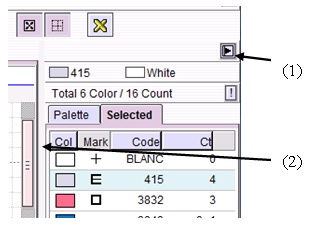
(1) Palette open/close button
Click to open/close the palette window.
(2) Palette window resize bar
Drag the bar to change the size of the palette.
(1) Palette open/close button
Click to open/close the palette window.
(2) Palette window resize bar
Drag the bar to change the size of the palette.
 Bottom
Threads/Comments closed.
Contents List [-] - A Cover Page
- Preface
- Acknowledgement
- Main Functionality
- System Requirement
- Screens
- Main Screens
- A Drawing Toolbar
- Other Stitches Drawing Toolbar
- Palette
- Selected Color List
- File/View Toolbar
- Menu Bar
- Creating and saving a chart
- Creaing a new chart
- Loading a saved chart
- Saving a chart
- Converting an image to a chart
- Saving a chart in a standard image format
- Chose a Background Color
- Chart Information - View & Edit
- Confirming the number of colors
- Resizing
- Editing Cross Stitch
- Basic Drawing Tools
- Drawing Special Stitches
- Basic Drawing Tools (2)
- Selection
- Changing a color and a mark
- Editing Other Stitches
- Drawing Back Stitches / Other Stitches
- Selecting Other Stitches
- Changing the color
- Checking the color
- Chaning the line style
- Adding comments to the chart
- Drawing Support Tools
- Cursor Information
- Support Lines
- Resizing Drawing Area and Palette Area
- Realview to check finished image
- Print Preview and setup
- Print contents
- An arrangement of a chart and a color table
- Automatic Divided Printing
- Options
- About the Author
- Search
Recent Comments [-] - A Cover PageHow can I create a h
- A Cover PageHi, I'm using KG-Cha
- Editing Other StitchesHi, Great program!
- File/View ToolbarHi Donna, Select a
- File/View ToolbarHow do I use the rot
- Saving a chart in a standard image formatIs there any way to
- Creaing a new chartThanks Joseph! I've
- Creaing a new chartI think "For cross s
- Saving a chart in a standard image formatWhat is the solution
- Saving a chart in a standard image formatI have a suggestion
- 1628